POUTPUT
The POUTPUT statement defines a list of VARIABLE statements that Adams Solver (C++) recognizes as system output during a LINEAR/STATEMAT analysis (see the LINEAR command).
Format
POUTPUT/id, VARIABLES=id1[,id2,...]
[ ] Optionally select the item |
Arguments
VARIABLES=id1[,id2,...] | Specifies the VARIABLE statements that describes the outputs of the Adams Solver (C++) model. |
Extended Definition
The POUTPUT statement, along with a PINPUT statement, is used with the LINEAR/STATEMAT command. POUTPUT defines the set of measured outputs from the system and PINPUT defines a set of inputs to the mechanical system. The LINEAR command linearizes the system equations to the following form:

where:
■x is the linearized system state array
■u is the array of system inputs defined by the PINPUT statement.
■y is the array of system outputs defined by the POUTPUT statement.
This form is commonly referred to as the state space form of the system equations in control theory. Adams Solver (C++) outputs the A, B, C, and D matrices for use in a control-system design or any other linear system analysis software. If only the A matrix is required, PINPUT and POUTPUT are not necessary.
When you run an analysis type other than LINEAR, the POUTPUT statement acts only as a pointer to the list of VARIABLE statements specified.
Both function expressions and user-written subroutines can access the POUTPUT statement. Function expressions access the values by using the internal Adams Solver (C++) function POUVAL(i1,i2) (see the PINVAL function), where i1 specifies the POUTPUT id, and i2 specifies the i2th VARIABLE in the POUTPUT statement list. Note that i2 is not the id of the VARIABLE.
User-written subroutines access single elements of the POUTPUT list and call the subroutine SYSFNC to access all values for a POUTPUT by calling the subroutine SYSARY (see the SYSARY and SYSFNC subroutines).
Tip: | VARIABLE statements may appear in more than one POUTPUT statement. This allows you to output two or more sets of state matrices at the same time. |
Examples
POUTPUT/4, VARIABLES=4,8,9,10
This POUTPUT statement identifies VARIABLES 4, 8, 9, and 10 as outputs from the mechanical system. These variables might represent part displacements and velocities, for instance. You may refer to this POUTPUT in a LINEAR/STATEMAT command.
Applications
The POUTPUT statement with the PINPUT, VARIABLE, ARRAY, TFSISO, LSE, and GSE statements define the interface between Adams Solver (C++) and control design and analysis packages such as MATRIXx and MATLAB.
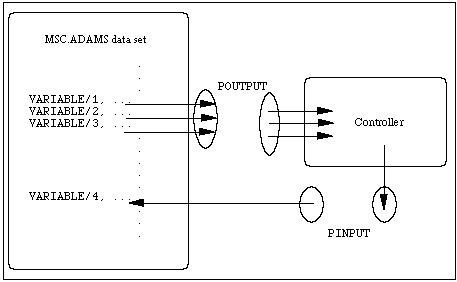
As shown in the figure below, PINPUT and POUTPUT act as socket for input and output to your controller, organizing the VARIABLE wires.
The LINEAR command uses PINPUT and POUTPUT statements to identify which variables to consider system inputs and outputs when generating state matrices. A control design program can use these matrices to design a controller for the system. The resulting controller may then be included in the Adams Solver (C++) model using VARIABLE, ARRAY, TFSISO, LSE, or GSE statements. See the LINEAR command.
PINPUT and POUTPUT as 'Sockets'
See other Reference data available.