PREFERENCES
The PREFERENCES statement controls general options that apply to the model defined in the Adams Solver (C++) dataset or the commands defined in the Adams Solver (C++) command file.
Format
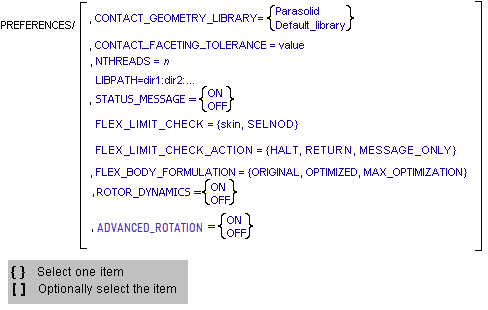
Note: | NTHREADS is an option for PREFERENCES C++ statement, so it would go in the Adams dataset, that is ADM file. |
Arguments
 | Select the geometry library to be used for contact operations: ■Parasolid - Specifies the Parasolid geometry library be used for three-dimensional contact determination. Adams Solver (C++) supports Parasolid version 35. ■Default_library - Specifies that the default geometry library be used for three-dimensional contact determination. The default library is based on RAPID, a polygon-based interface detection package developed at the University of North Carolina. Currently, Adams Solver (C++) supports RAPID 2.01. For many models, the Default Library can substantially reduce simulation time. Because it is polygon-based, however, it is not always as accurate as the Parasolid geometry engine. Parasolid is an exact boundary-representation geometric modeler, which makes it highly accurate, but not as fast as a polygon-based engine. For these reasons, you can switch from one to the other depending on your needs. |
CONTACT_FACETING_TOLERANCE=value | Specifies the resolution of the mesh that is to be created from the solid geometries in the model. Contact kinematics are calculated by intersecting the meshes corresponding to two solid geometries. A finer mesh results in more accurate contact calculations. Calculations may be slower, however, and computer memory requirements increase as the mesh resolution increases. The faceting tolerance is defined as the maximum error between the true surface and the surface of the faceted representation of the geometry. The maximum error is guaranteed not to exceed (1/value) * the minimum dimension of each geometry's bounding box. The default value of this parameter is 300.0028. The value specified for the faceting tolerance only applies to geometry read from a Parasolid file. All native geometry (ellipsoid, cylinder, box, frustum, torus, surface of revolution, and extrusion) is tessellated with a fixed tolerance when a faceting tolerance is specified. Stl and shl files have fixed faceting that cannot be changed. |
LIBPATH=dir1:dir2:... | Specifies a colon-separated list of directories which are to be searched for user subroutine plug-in libraries before searching in the default locations. See the ROUTINE Argument for more information. |
NTHREADS=n | Specifies the number of parallel threads that Adams Solver (C++) will use when performing the simulation. The number of threads, n, must be an integer in the range of 1 to 128. The default value is 1. By executing multiple threads in parallel across multiple processors, Adams Solver (C++) can reduce the walltime required for a simulation. Typically, the optimal number of threads is between N and 2N, where N is the number of processors (including virtual processors, such as Pentium processors supporting HyperThreading). Note that this option has no effect on IRIX architectures. Note: The Intel® Pentium® 4 processor introduced a feature called Hyper Threading, where a single physical processor can support more than one logical instruction stream, simulating multiple logical processors on a single physical processor. For many applications and environments, this capability may offer performance improvements over non-Hyper Threading processors. If multiple analysis jobs are running concurrently, however, there may be performance degradations. If an installation determines this to be the case, hyper threading should be disabled. This can be done on a permanent basis through BIOS operations or, for Windows platforms, hyper threading may be disabled on a process by process basis using the “hyperthreads” keyword. Learn about Threaded (Parallel) Operation of Adams Solver (C++). |
STATUS_MESSAGE | Controls the presence of two status messages in the .msg file produced by Adams Solver (C++). These status messages mimic status messages produced by Adams Solver (FORTRAN). This preference has no effect on Adams Solver (FORTRAN). Default: OFF The first status message is sent after every simulation and has the form “Simulate status =i”. The second message is sent when Adams Solver (C++) terminates and has the form “Termination status = i”. In both cases, “i” is an integer number reporting the status. |
FLEX_LIMIT_CHECK={skin, SELNOD} | Enables flexible body linear limit checking on all the flexible bodies. ■skin - Adams Solver (C++) will check the deformation of all the nodes on the skin to see whether they exceed the linear limit. To use this option, MNF_FILE or DB_FILE need to be specified in FLEX_BODY statement. ■SELNOD - Adams Solver (C++) will only check the nodes specified in SELNOD section in MTX file. The linear limit is defined as 10% of the characteristic length of the flexible body. User can use CHAR_LEN in FLEX_BODY statement to specify the characteristic length. If CHAR_LEN is not specified, Adams Solver (C++) will try to calculate the characteristic length use MNF or MD DB if MNF_FILE or DB_FILE is specified. Otherwise, Adams Solver (C++) will issue a warning. |
FLEX_LIMIT_CHECK_ACTION={HALT, RETURN, MESSAGE_ONLY} | Specifies what action Adams Solver (C++) should take if a flexible body exceeds its linear limit. ■HALT - Terminates execution of Adams Solver (C++). ■RETURN - Stops the simulation and returns to the command level. ■MESSAGE_ONLY - Issue a warning message only (Default). |
FLEX_BODY_FORMULATION = {ORIGINAL, OPTIMIZED, MAX_OPTIMIZATION} | Specifies which formulation Adams Solver (C++) should use for all the flexible bodies in model ■ORIGINAL: This is the conventional flexible body formulation in which all the equations are solved simultaneously. ■OPTIMIZED: In this formulation, the 'modal equations' of each flex body are solved separately from the rest of equations. A separate numerical integrator is used for each subsystem of modal equations. ■MAX_OPTMIZATION: In this formulation, the 'modal equations' of each flex body are solved separately from the rest of equations using semi-analytical solution method. Please see Formulations in Adams Solver for more details. |
ROTOR_DYNAMICS | Turns ON or OFF the computation of local gyroscopic effects (such as stress stiffening/spin softening due to high speed rotor dynamics) for flexible bodies in the model that have rotor dynamic definitions included in the MNF. If this argument is not present, the model behaves as though this setting is OFF. |
ADVANCED_ROTATION | Use a singular-free rotation representation to solve the dynamic equations of motion. This option is supported by the GSTIFF, WSTIFF, HHT and NEWMARK integrators. Default value is on. This setting can improve solver efficiency for rotation-dominant models. |
Threaded (Parallel) Operation of Adams Solver (C++)
Adams Solver (C++) allows for threaded operations (multiple threads of execution operating in parallel). Selecting multiple threads can allow Adams Solver (C++) to take advantage of systems with multiple processors and, therefore, reduce the walltime for a simulation to complete (that is, the amount of time the operator spends waiting).
The reduction in execution time that threaded operation can provide depends greatly on the particular model being simulated. You can expect walltime speed ups of 1.2 times (serial execution time/threaded execution time). Depending on the model, however, anywhere from no speed improvement to more than 2 times are possible.
Models that reference user-written subroutines will not see the full benefit of parallelization unless the user-written subroutines declare themselves as threadsafe. See the utility subroutine, ADAMS_DECLARE_THREADSAFE, for more information.
Note that some differences in simulation results are expected between the different versions of Adams Solver (C++). These are due to roundoff and code reorganization and do not represent an error. The results of threaded simulations should always be carefully checked to determine whether or not the solution quality is acceptable. In particular, repeated simulations of the same model should give identical answers. If not, the degree of parallelization should be reduced, first by removing calls to ADAMS_DECLARE_THREADSAFE, and if that isn't sufficient, by setting PREFERENCES/NTHREADS=1, until the results are correct.
Examples
Using the Parasolid geometry provided by MSC Software:
PREFERENCES/CONTACT_GEOMETRY_LIBRARY=Parasolid
Loading a user subroutine plugin:
VARIABLE/1, ROUTINE=foo::bar, FUN=USER(2,3)
PREFERENCES/LIBPATH=/home/joe/plugins:/usr/projects/lifters
Adams Solver (C++) searches for a user subroutine named BAR in a dynamically loaded library named libfoo.so (see documentation for ROUTINE Argument for more information about library name rules) in the directories /home/joe/plugins and /usr/projects/lifters, before searching in the default plugin directories.
Caution: | The LIBPATH argument only influences the search for the highest level plugin library. For example, if a plugin library, libA.so, depends on another library, libB.so, and this library is located in a directory specified by LIBPATH, then libB.so will not be found, unless the DT_RPATH or DT_RUNPATH attributes are present on libA.so, as specified (often with an -rpath option) during the creation of libA.so. This shortcoming of LIBPATH is unavoidable, because the dependency on libB.so is resolved by the underlying runtime loader, whose search paths cannot be altered at run-time. |
See other Analysis parameters available.