PSTATE
The PSTATE statement defines a set of user-defined coordinates to be used during a LINEAR analysis (see the LINEAR command).
You can specify as many states as there are degrees-of-freedom. If a smaller set of states are provided, then the system will "fill in" by choosing a set of internally available states for the ones that were not explicitly specified. If too many states are specified, Adams Solver (C++) identifies and discards the redundant states.
For theoretical details, see the white paper in Simcompanion Knowledge Base Article KB8016460.
For an example of using PSTATE, see Simcompanion Knowledge Base Article KB8016414.
Format
PSTATE/id, VARIABLES=id1[,id2,...]
[ ] Optionally select the item |
Arguments
VARIABLES=id1[,id2,...] | Specifies a list of VARIABLE statements. Each VARIABLE must define a displacement or angular expression; the expressions must be nonconstant. The VARIABLE expressions constitute a set of user-defined coordinates to be used during a linearization or eigensolution computation. |
Extended Definition
The PSTATE statement is used with the LINEAR/STATEMAT or LINEAR/EIGENSOL or LINEAR/MKB command. PSTATE defines a set of user-defined coordinates. The LINEAR/STATEMAT command linearizes the system equations to the following form:

where:
■x is the linearized system state array.
■u is the array of system inputs defined by the PINPUT statement.
■y is the array of system outputs defined by the POUTPUT statement.
This form is commonly referred to as the state space form of the system equations in control theory. Adams Solver (C++) outputs the A, B, C, and D matrices for use in a control-system design or any other linear system analysis software.
By default, the system state array x is a subset of the system coordinates (and respective derivatives) used by Adams Solver (C++) to build the linearized equations. The system coordinates are global rotations (AX, AY and AZ) and global displacements (DX, DY and DZ) of the PART's BCS with respect to the GROUND origin expressed in the GROUND coordinate axes. However, the user may change the default set of system coordinates and have Adams Solver (C++) use arbitrarily defined coordinates instead. Using a PSTATE statement, the linearized equations are:

where the system state array s is the set of user-defined coordinates.
Use the following guidelines when creating PSTATE objects and their associated VARIABLEs' function expressions:
1. Function expressions must be define a nonconstant displacement or angular measure.
Example
VARIABLE/2, FU=DX(10,7)
VARIABLE/3, FU=PSI(8,7)
PSTATE/33, VAR=2, 3
If the function expression is a constant or it is not a displacement, the code will reject the definition.
2. The displacement or angular measures can be global or relative.
Example
! Defining a relative coordinate
VARIABLE/2, FU=DX(10,5,7)
PSTATE/33, VAR=2
3. The number of VARIABLES in the PSTATE statement can be less than the number of degrees of freedom of the model. Adams Solver (C++) completes the state array using coordinates taken from the set of default system coordinates.
4. The number of VARIABLES in the PSTATE statement can be greater than the number of degrees-of-freedom of the model. Adams Solver (C++) selects the required number of user-defined coordinates and ignores the rest.
5. Adams Solver (C++) rejects redundant definitions.
Example
! Redundant definitions
VARIABLE/7, FU=DX(10,2)
VARIABLE/8, FU=8*DX(10,2)
PSTATE/34, VAR=7, 8
In this example, Adams Solver (C++) ignores one of the above VARIABLE definitions.
6. Adams Solver (C++) may ignore a user-defined coordinate if there is already an equivalent default definition.
Tip: | ■VARIABLE statements may appear in more than one PSTATE statement. ■Do not confuse a PSTATE statement with the PSTATE option in the LINEAR command. |
Examples
The model shown in the figure below is a simple rigid helicopter blade.
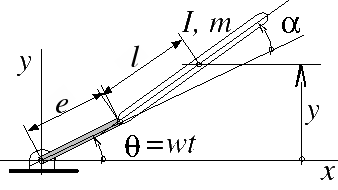
Assuming that MARKER/10 is located on the CM of the blade, by default, Adams Solver (C++) will linearize the model using the rotation AZ(10). If you want to linearize the model using the displacement 'y' shown in the figure, then add the following objects to the data set:
VARIABLE/1, FU=DY(10)
PSTATE/1, VAR=1
In the command file add
LINEAR/STATE, PSTATE=1
In this case, Adams Solver (C++) linearizes the system using the 'y' coordinate shown in the figure (see Using the PSTATE option section in the LINEAR command).
Applications
The PSTATE statement is of fundamental importance in cases in which you need to linearize the system using relative coordinates. The most important case is the eigenvalue calculations of rotating systems. Theory shows that in a rotating (or accelerating) system, the eigenvalues depend on the choice of coordinates used to linearize the model.
For example,
LINEAR/EIGENSOL, PSTATE=2
forces Adams Solver (C++) to linearize and compute eigenvalues of a model in terms of the user-defined coordinates found in the VARIABLEs belonging to the PSTATE/2 object.