UDE Basics
The UDE Definition and UDE Instance
The two UDE-related objects in Adams View are:
1. UDE Definition:
■Specifies the modeling objects and topology that make up the UDE
■Can be a child of a model, or belong to an Adams View session stored in a library. If stored in a library the UDE Definition will not be included when exporting an Adams View command file of a model (even if that model contains instances based on the UDE definition)
■The entities that ultimately make up a UDE definition can be sorted into four types:
♦Objects: The set of modeling objects which make up the UDE definition
♦Parameters: Design variables used to control parameterization of the UDE, spring stiffness for example (the “general_parameter” object in the Adams View database)
♦Inputs: Entities outside the UDE referenced by the UDE, typically a reference marker (the “input_parameter” object in the Adams View database)
♦Outputs: Entities inside the UDE that should be accessible outside the UDE, often a marker that can be used as reference for another UDE or other entities. (the “output_parameter” object in the Adams View database)
■In general, UDEs cannot be nested. That is, a UDE definition cannot contain another UDE as among the modeling objects in it; notable exceptions:
♦A UDE definition can include an Adams View spring-damper (which was developed as a special UDE element by MSC)
♦Adams Machinery internally uses nested UDEs via MSC-authored code
2. UDE Instance:
■A specific object in model that is based upon a given UDE definition
■Is a child of a model; so, will be included when exporting an Adams View command file of a model. If the corresponding UDE definition is not included in the .cmd file because it resides in an Adams library, then it must be present in the Adams View session prior to importing the .cmd file containing the UDE instances referencing it. See Creating a UDE Definition for details about how to bring library-resident UDE definitions into your Adams View sessions.
Working with UDEs in Adams View
There are two means by which users can work with UDEs in Adams View. The first is interactively via the UDE Definition and Instance dialogs launched from the ribbon’s Elements tabs as shown here:
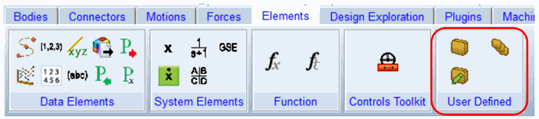
The other way to work with UDEs in Adams View is manually through the Adams View command language and by writing your own macros to enable basic functionality for these UDEs like modify, copy, delete and so on.
Both of these ways of working are described in this guide in the following two sections.