Creating a UDE Definition
To create a UDE Definition, use the "Ude Create Definition" dialog launched from the command navigator:
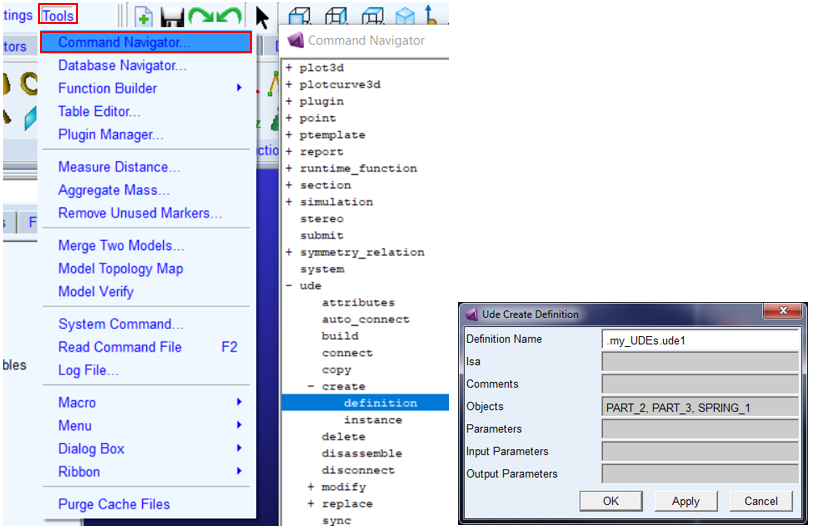
This is where the contents of a UDE definition can be specified - the definition of what modeling objects make up the UDE. These are specified in the Objects field. A summary of this and other important fields and concepts of the UDE Definition follows below:
■Isa: Specifies name of an existing UDE definition in same class, so that instance of this UDE can be replaced with UDE definition of same class specified by 'isa' parameter.
■Comments: Specifies comment for UDE definition being created
■Objects: The set of modeling objects which make up the UDE definition
■Parameters: Variables used to control parameterization of the UDE (spring stiffness for example)
■Input Parameters: Entities outside the UDE referenced by the UDE (typically a reference marker). The parameter itself is an object variable containing the marker reference.
■Output Parameters: Entities inside the UDE that should be accessible outside the UDE (often a marker that can be used as reference for another UDE or other entities). This parameter is also an object variable containing the object that should be referenced.
Be aware that the UDE Definition must be stored under an Adams View "library" object. So, the Definition Name must have a library name at the beginning. As such, UDE Definitions are not children of a model but, rather, belong to an Adams View session stored in a library. So, UDE definitions will not be included when exporting an Adams View command file of a model (even if that model contains instances based on the UDE definition). Prior to loading models containing instances of a given UDE Definition, one must first ensure the Adams View session contains the library with the UDE definition. This can be done, at the beginning of your Adams View session, by reading an Adams View command file that does this, or by putting those commands in one of the files that Adams View executes automatically upon startup if found in Adams View's default working directory (startup directory): "aview.cmd" or "aviewAS.cmd".
For more about storing Adams View customizations, see Saving Interface Changes.
For a step-by-step tutorial illustrating how to create a UDE definition, including creation of a library, see Tutorial: Simple UDE.