Function Builder
Tools → Function Builder
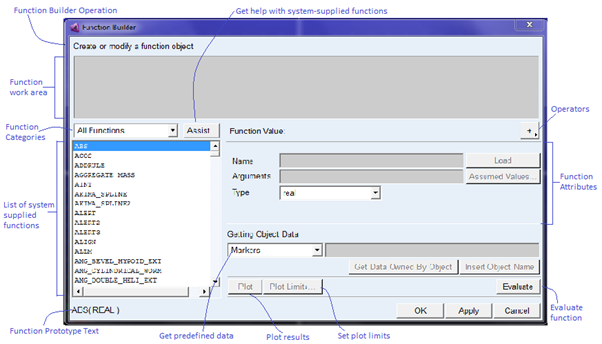
Helps you create and modify functions and parameterize values for various entities. You can either work in the Expression mode (refer the listing of Design-Time Functions) or the Run-time mode (refer the listing for Run-Time Functions).
Expression Mode
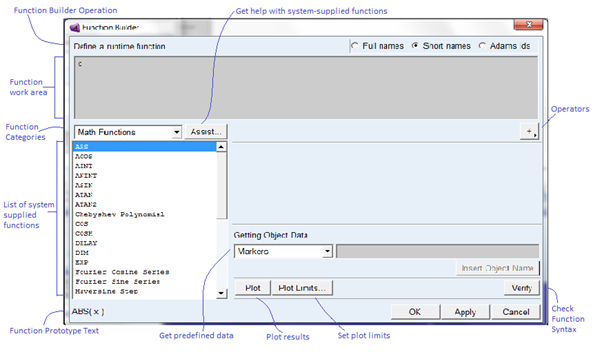
Run-time Mode
1. Standard run-time function mode
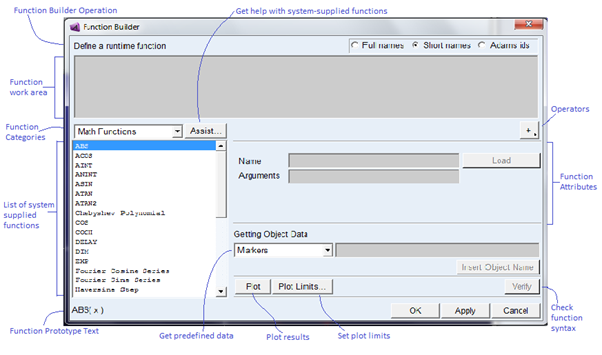
2. User supplied run-time function mode
For more information on Function Builder, see the Adams View Function Builder online help.
For the option: | Do the following: |
|---|---|
Create/modify a function object | You can type in a function or choose from the list of system supplied functions. |
Expression Mode Function Categories | Use the pull-down menu to choose from: ■All Functions ■Math Functions ■Location/Orientation Functions ■Modeling Functions ■Matrix/Array Functions ■String Functions ■Database Functions ■File Functions ■Misc. Functions Information on Types of Functions. |
Runtime Mode Function Categories | Use the pull-down menu to choose from: ■Displacement ■Velocity ■Acceleration ■Contact Functions ■Clearance Functions ■Spline ■Force in Object ■Resultant Force ■Math Functions ■Data Elements ■Subroutines ■Constants & Variables ■FE Part ■All Functions |
Assist | Only available for certain functions. Displays a dialog box to help you with function parameters. |
 | Click to add a plus (+) sign or right-click for more operators. |
Name | Enter a name of a new or existing function object. |
Load | Select to update with the properties of the current function object. |
Type | Select the type of value you want the function to return. Choose from: ■real ■integer ■array ■string ■object ■location_orientation |
Arguments | Enter the names of arguments for the function object. |
Assumed Values | Select to specify assumed values for arguments to be used during validation and/or plotting. |
Getting Object Data | Select a type object allowed in the object field. Choose from: ■Markers ■Parts ■Design Points ■Design Variables ■Results Data ■Measures ■All Objects Enter the name of an object to insert into your function definition in the field next to the pull-down menu. |
Get Data Owned By Object | Select if you want to get the name of a data field owned by the object and insert it into your function definition. |
Insert Object Name | Select if you want to insert the object name into your function definition. |
Plot | Select to plot your function. |
Plot Limits | Select to specify the horizontal limits for plotting your function. |
Evaluate | Select to evaluate your function. |
Verify | Check run-time function syntax. |