Object Position Handle
Settings → Object Position Handle
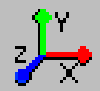
Allows you to create a global position handle with respect to the which you can translate and rotate selected objects. When you create a global position handle, Adams View turns off the object position handle for individual objects.
Learn more about Using Object Position Handle.
Learn more about Using Object Position Handle (Classic Interface).
For the option: | Do the following: |
|---|---|
Set Handle Location | Select and click on the screen to indicate the location of the handle. |
Orientation Via | First, in the pull-down menu, select how you want to orient the handle. You can orient the axes of the handle. By default, the orientation of the position handle is set to that of the current working grid axes. Next, select Orientation Via to set. |
Reset | Select if you want to reset the location of the global position handle to the location of the selected object's position handle. |