About Optimization
Learn general information on Optimization, tips on using the optimization tools in Adams View, and additional reference material for the Adams View optimization analysis:
Optimization Background
Learn general information on Optimization:
Why Optimize?
Optimization is a sophisticated tool that helps you improve the overall design of your product. Having a good design early in the process helps you shorten your design cycle.
Most designs have specific requirements, such as to support a specified load or trace a specified path. There is usually some means of distinguishing a good design from a bad design: it is too heavy or it will cost too much to produce. Some requirements can be restrictions on a design: packaging, end conditions, or material availability.
Part of the design process is to manipulate the unknowns (variables) in a design to arrive at a good design that satisfies all goals (objectives) and restrictions (constraints). If these features can be quantified, optimization techniques can be used to analytically arrive at the theoretical best solution. The process of optimization can also provide you with important information such as:
■Are there too many constraints on the solution, where relaxing certain specifications might provide an acceptable result?
■Are there superfluous design constraints, and do some design constraints dictate the results?
■Is the overall design sensitive to certain design parameters and not others?
What is Optimization?
In general, an optimization problem is described as a problem to minimize or maximize an objective function over a selection of design variables, while satisfying various constraints on the design and state variables of the system. Various algorithms are available for finding a solution to an optimization problem, given the problem has been formulated in the manner described in this section.
The objective function is a numerical representation of the quality, efficiency, cost, or stability of the model. You decide whether the optimization chooses to find the minimum or maximum of the function. The optimum value of this function corresponds to the best design possible using that particular mathematical model. Examples of objective functions include execution time, energy (effort) required, and total material costs.
Design variables can be thought of as the unknowns for the design problem. These are the parameters you can alter to define the design. Changes in the design variables should result in changes to the objective. Examples of design variables are part dimensions, force amplitudes, and individual part masses.
Constraints are boundaries that directly or indirectly eliminate unacceptable designs. Constraints often take the form of additional goals for the design:
■The overall weight of the machine must be less than 1 ton.
■The path traced by a robot arm must pass through certain points
■The fundamental frequency of a vehicle must be greater than 1 Hz.
Mathematics and Methods
A mathematical language for describing an optimization problem is typically used in textbooks. The optimization problem is described with a set of conditions such as:

(read as: minimize the objective function J over choices of u, the design variables)
subject to:

with initial and final conditions given by:
If a solution exists, the output of the optimization gives the optimal design variables u* that satisfy all of the constraints and minimize the objective function J. The formulation and solution of such an optimization problem involves standard techniques of mathematical programming. You are only required to describe the optimization problem in the terms outlined above.
Solutions
A local minimum or maximum exists where the gradient, or derivative of J with respect to u, goes to zero. For this reason, the solution to an optimization is the solution to a system of nonlinear equations. Nonlinear solvers are iterative methods that take steps of the form:
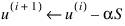
Where the u's are the iterates, S is referred to as the search direction, and  is the step size. In English, each step of the process tries to get close to the solution by traveling along the direction S by an amount . The determination of and S distinguishes the solution algorithms. S is usually of the form:
is the step size. In English, each step of the process tries to get close to the solution by traveling along the direction S by an amount . The determination of and S distinguishes the solution algorithms. S is usually of the form: 
-J denotes the gradient of J. H is referred to as the Hessian (matrix) of J and is constructed to improve the convergence of the algorithm. The best convergence is achieved when H is the Jacobian matrix of second partial derivative of J. This is the Newton-Raphson method. Newton-Raphson is rarely used, since the computation of these derivatives is often impossible or too expensive to calculate. Other methods use various, less expensive approximations to the Jacobian.
Once the search direction, S, is chosen, the step size is chosen using a one-dimensional minimization of J with as the design variable. This is usually referred to as the line search and uses the bisection algorithm, golden search, or any of a number of minimization methods.
is chosen using a one-dimensional minimization of J with as the design variable. This is usually referred to as the line search and uses the bisection algorithm, golden search, or any of a number of minimization methods. Additional References
■VMA Engineering. DOT User's Manual. Goleta, CA, 1993.
■J. J. More and S. J. Wright. Optimization Software Guide, SIAM, Philadelphia, 1993.
■D. E. Kirk. Optimal Control Theory. Prentice - Hall, Englewood Cliffs, NJ, 1970.
■U. Kirsch. Optimum Structural Design. McGraw-Hill, 1981
Tips on Using Optimization
Preparing for Parametric Analyses contains detailed information on preparing your model for Optimization and performing an optimization analysis. The following contain tips on getting the most from an optimization analysis:
Creating the Objective
The objective function, also called the cost functional, performance measure, or performance index, is a numerical quantification that distinguishes or rates candidate designs. The optimum design is achieved when the objective function is minimized or maximized. In the case of minimization, the objective grows smaller as the design improves. In the case of maximization, the objective grows larger as the design improves.
Typical objectives include time, energy, or displacement from a path. Some standard objective functions may be created as follows:
■Minimum time - Use a SENSOR to stop an analysis when the conditions of the optimization are satisfied. The time for the analysis is then written as the last record of a result set. If you use a SENSOR to HALT the analysis, also set the PRINT argument on that SENSOR. Otherwise, the optimizer only uses information from the previous output step.
■Minimum mass - Write an Adams View function that sums the masses of all applicable parts. The masses of the parts are the design variables.
■Minimum effort - Write a DIFF that describes the torques applied to the system that are to be minimized. The integral of this differential equation is given as the last record in the result set.
Testing the Objective or Constraint
Adams View allows you to interactively apply the objective or constraint to an analysis and print the resulting value. This helps you develop and debug objectives and constraints. It is a good idea to test your objective or constraint on an existing analysis before using it in an optimization.
To test one objective or constraint:
1. From the Simulate menu, point to Design Objective or Design Constraint, and then select Evaluate.
Adams View displays the Optimize Objective Evaluate dialog box or the Optimize Constraint Evaluate dialog box.
2. In the Objective or Constraint Name text box, enter the objective or constraint name.
3. In the Analysis Name text box, enter the name of an analysis.
4. Select OK.
Adams View prints the objective or constraint value in the Information window.
To test all objectives or constraints:
■On the ribbon menu, click the Design Exploration tab. From the Design Evaluation container, click the Evaluate All With Default Analysis icon  .
.
. Adams View prints the objective or constraint value in the Information window.
Making Your Model Robust
Optimization works best on robust models. There are two key elements to model robustness. First, you should be sure that the model is physically realistic for the entire range of your design variables. For example, it is usually impractical to allow zero damping, so keep the lower bound above zero if you use damping as a design variable.
Second, you should make sure that your model is stable. Small changes in the design variables should not lead to gross changes in the objective function. Like everything else, optimization algorithms work best with smooth, stable functions. For more information on improving optimizer performance, see Ensuring Accurate Run Results.
If the model is not robust, optimization is still possible, but more effort is required. In particular, the parameters for the finite differencing need to be massaged. The key to accurate optimization is good gradient information. Presently, Adams uses finite differences to compute gradients. You have control over the method and step size used. The forward difference method passes a line through the design point and a forward perturbation. The central difference method passes a parabola through the design point and both a forward and backward perturbation.
If you are certain that your model is robust, use forward differences since it is faster. If not, use central differences to focus in on the optimum, then switch to forward differences.
The size of the perturbation can also reduce the effect of errors in the analysis. Naturally, you want to remove as much of this as you can. If you are uncertain of the accuracy and smoothness of your model, use a large perturbation at first, then reduce it as you get better designs. Remember that the accuracy of the gradients generally improves as the perturbations get smaller.
When optimizing curves, try to define the curve using analytical functions. If you must use discrete values, use control points. The optimizer tends to perturb curve points one at a time. The interpolation using curve points (cubic splines) tends to be more oscillatory under single point perturbation, which can confuse an optimization algorithm.
The scaling of the optimization variables (design, constraints, and objective) also affects the performance. It is best to choose variables and functions that are similar in magnitude.
Monitor the scale of objectives, gradients, and constraints. Large values for objectives and gradients impede optimization. Small values of constraints under-emphasize the constraints.
Finding Global versus Local Optima
One way to make sure you have converged to the global optimum is to cut local optima out of the design space using constraints. If the optimizer has computed a local optimum (for example, OPT1) re-run the optimization with a constraint that forces the objective function to be less than (for example, .8*OPT1). The constraint function is the same as the objective function shifted 0.8*OPT1 downward. This has the effect of removing the local optima from the design space and shifting the initial guess for the next optimization closer to the global optimum. If OPT1 is the global optimum, the optimizer is not able to find a solution. Otherwise, the new solution, OPT2, may be the global optimum, and you may want to repeat the process.
Predicting Execution Time
You can compute a rough estimate of the number of runs that a particular model requires for each iteration. You must know the number of design variables and the differencing technique.
Each iteration is broken into two phases: computing gradients and performing a line search. To compute gradients in Adams View, finite differencing is used. Each design variable is perturbed slightly and the difference in the objectives and constraints is measured with respect to the change in the design variables. When using forward differencing, one analysis is performed for each design variable. When central differencing is used, two analyses are performed for each design variable.
Once the gradients are computed, the optimization algorithm determines a search direction. A line search is performed in this direction, attempting to improve the design. The number of iterations performed by the line search is determined greatly by the accuracy of the gradients. If the gradients are highly accurate, then the line search often terminates after one or two analyses. If the gradients are poor, then the line search can cause ten or more analyses to be performed. These estimates vary widely depending upon your particular optimization algorithm.
So, for forward differencing:
runs_per_iteration =number_of_design_variables + length_of_line_search
For central differencing:
runs_per_iteration =2 * number_of_design_variables + length_of_line_search
Validating the Optimum
Always plot or chart the objective value versus the iteration. If it is not flat at the end, this indicates that you have not reached the optimum design. You need to reduce the convergence tolerance in the Optimizer settings section of the Solver Settings dialog box to force the optimization to proceed further and reach the optimum. For more information on plotting the objective, see Generating Plots.
Refining an Optimization
Optimization is an iterative process in more ways than one. You will probably perform several optimizations before you are satisfied with the results.
The way you define design variables, constraints, and objective functions has a profound effect on the performance of the optimizer and on the results of the optimization. You may need to change your objective, add constraints, or make other changes before you pose your problem in the right way.
The default values for optimization parameters may not always give the final answer, but can bring you closer to the final answer. You may need to experiment with optimization settings to arrive at the best combination for your application.
Optimization Settings
The optimization settings are accessible from the Solver Settings dialog box when you select Optimization. Learn about Accessing the Solver Settings Dialog Box.
Learn about each of the optimizer settings:
Algorithm
Algorithm specifies the algorithm used to perform the optimization. The MSCADS algorithms are provided with Adams View. The DOT algorithms can be purchased from Vanderplaats R&D, Inc. You can also include your own optimization algorithm. The contact information for Vanderplaats R&D, Inc. is:
Vanderplaats R&D, Inc.
1767 S. 8th Street, Suite. 100
Colorado Springs, CO 80906
http://www.vrand.com/
http://www.vrand.com/products/dot-optimization/
1767 S. 8th Street, Suite. 100
Colorado Springs, CO 80906
http://www.vrand.com/
http://www.vrand.com/products/dot-optimization/
■MSCADS-MMFD - Use the MMFD (Modified Method of Feasible Directions) algorithm from MSC Automated Design Synthesis (MSCADS) code. This algorithm requires that design variables have range limits, since it works in scaled space.
■MSCADS-SQP - Use the SQP (Sequential Quadratic Programming) algorithm from MSC Automated Design Synthesis code. This algorithm requires that design variables have range limits, since it works in scaled space.
■MSCADS-SLP - Use the SLP (Sequential Linear Programming) algorithm from MSC Automated Design Synthesis code. This algorithm requires that design variables have range limits, since it works in scaled space.
■MSCADS-SUMT - Use the SUMT (Sequential Unconstrained Minimization Technique) algorithm from MSC Automated Design Synthesis code. This algorithm requires that design variables have range limits, since it works in scaled space.
■MSCADS-OPT - Enables a user selectable optimization strategy as documented in Vanderplaats, G.N., ADS - A Fortran program for Automated Design Synthesis - Version 1.10, NASA CR 177985, 1985, Appendix A. The default is recommended.
■DOT1 - Use DOT with BFGS (Broydon-Fletcher-Goldfarb-Shanno) for unconstrained problems. Use DOT with MMFD (Modified Method of Feasible Directions) for constrained problems.
■DOT2 - Use DOT with FR (Fletcher-Reeves) for unconstrained problems. Use DOT with SLP (Sequential Linear Programming) for constrained problems.
■DOT3 - Use DOT with FR (same as DOT2) for unconstrained problems. Use DOT with SQP (Sequential Quadratic Programming) for constrained problems.
■User 1, User 2, User 3 - Allows you to invoke a user-written optimization algorithm that has been linked to Adams View. (See Linking External Algorithms.)
Convergence Tolerance
Convergence tolerance is the limit below which subsequent differences of the objective must fall before an optimization is considered successful. If the condition ABS(objective[now] - objective[now-1]) < convergence_tolerance is true for a certain number of iterations (usually two), then the convergence tolerance criterion is met. Note that this is only one test that is made by most optimization algorithms before they terminate successfully.
Like other Adams Solver tolerances, you may need to experiment with this tolerance to find the right value for your application. Display the objective versus iteration strip chart. If the optimizer quits even though the last iteration made noticeable progress, try reducing the tolerance. If the optimizer continues iterating even after the objective has stopped changing very much, make the tolerance larger.
Maximum Iterations
Maximum iterations tells the optimization algorithm how many iterations it should take before it admits failure.
Note that a single iteration can have an arbitrarily large number of analysis runs (see Predicting Execution Time).
Rescale Iterations
Rescale iterations is the number of iterations after which the design variable values are rescaled. If you set the value to -1, scaling is turned off.
Differencing Technique
The differencing technique controls how the optimizer computes gradients for the design functions. Centered differencing perturbs each design variable in the negative direction from the nominal value, then again in the positive direction using finite differencing between the perturbed results to compute the gradient. If you choose forward differencing, each design variable is perturbed in a positive direction only.
Centered differencing can sometimes generate smoother, more reliable gradients (especially in noisy models), but it causes twice as many analysis runs to be performed.
Differencing Increment
The differencing increment specifies the size of increment to use when performing finite differencing to compute gradients. When using forward differencing this value is added to the nominal value of each design variable on successive runs. When using central differencing, this value is first subtracted from the nominal value and then added to it.
Smaller increments may give more accurate approximations of the gradient, but are also more susceptible to random variations from run to run. Larger increments help minimize the effects of variations, but gives less accurate gradients. For more information on controlling variations, see Ensuring Accurate Run Results.
Debugging Output
Turning on debugging output sends copious optimizer diagnostics to the window that launched Adams View. Keep an eye on that window anyway, as some important warnings might be written there.
The debugging output shows you the data the optimizer is receiving from Adams View, among other things. If the optimizer is behaving erratically, this may help you determine the source of the problem.
Minimum Number of Converged Iterations
The number of consecutive iterations for which the absolute or relative convergence criteria must be met to indicate convergence in the DOT Sequential Linear Programming method.
User Parameters
Adams View passes the user parameters to a user-written optimization algorithm. Realizing that there may be parameter information that is not conveyed through the existing parameter set, this parameter was added to allow you to pass any real numeric data to your algorithm.
Linking External Algorithms
In addition to the algorithms provided in Adams View, you have the option of linking in up to three other Optimization algorithms of your choice. Once you have written the appropriate interface, compiled and linked your code, you can invoke your algorithm by setting the optimization algorithm to user1, user2, or user3.
User-supplied optimization algorithms must be registered by calling a function built in to Adams View. This function call must be placed in the registration function supplied in source code form with Adams View. Follow these steps to add your own optimization algorithm to Adams View:
1. Locate and copy the appropriate source code template, vc_init_usr.c or vc_init_usr.f, depending on whether you want to write code in c or fortran from:
$topdir/aview/usersubs
2. Write your interface function by modifying the source code template. Vc_init_usr.c has instructions within it in the comment section on how to do this (that is, search for "doe_example" in the c source code).
3. Add your new function to the registration function and compile it as a custom Adams View design function.
4. Link your interface function and the modified registration function with Adams View as described in Running and Configuring Adams.