The Workbook File for Adams Car
The picture below shows the Hardpoints of two subsystems in an Adams Car assembly in the Adams Explore workbook format for Adams Car. In the Adams Car format each block consists of a header with major and minor role identifiers for the subsystem in question. Below a table of the Hardpoints is displayed. The first column is the Hardpoint name without its "hp[lrs]_" prefix, the second is the symmetry of the object. Available to the right of the symmetry are the respective properties of the object that can be changed, in this case the x, y and z coordinates of the Hardpoint. Also a comment, if such is associated with the object, is displayed.
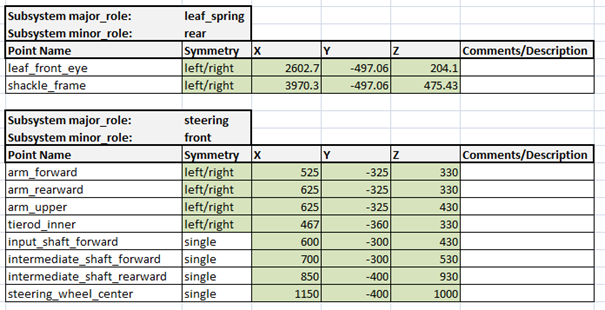
This principal design is reoccurring throughput the sheets of the workbook file for the sheets containing information about entities that an engineer can change based on design choices.
On the Analyses sheet the analyses are listed together with settings and paths. On this page the hyperlink to the web server is made available. Use the Export Assembly to Adams Explore Workbook dialog box help of the export dialog for details on the parameters.

About the File Format
The link is the a file with extension ".xlsx", the official name "Office Open XML Workbook", but more commonly known by the name borrowed from its most popular editor Microsoft Excel. The original version by the format was released with Microsoft Excel 2007 and is an open format created by Microsoft. Because of the openness, there are now more editors able to read and write the format to various degrees of compatibility. Those include LibreOffice and Google Docs. More information can be found at: https://en.wikipedia.org/wiki/Office_Open_XML. Specific information regarding xlsx editor compatibility based on MSC testing:
■Microsoft Excel 2013 has been formally tested with success
■Microsoft Excel versions prior to 2007 are not supported since they do not write the xlsx format
■Libre Office 5.2 has been formally tested with success
■Open Office is not recommended; MSC testing has shown it writes incompatible xlsx files
Adams Explore reads and writes xlsx-files using the python package openpyxl.
Important: | ■As openpyxl does not support all of the information that Microsoft Excel can export to an xlsx file, Adams Explore and openpyxl should never be made to write information to the only existing copy of a file containing critical information. If the information is not supported by openpyxl it may be removed from the file and may be lost. ■If a variable has a value that is too long to be supported by the xlsx format the following message might be given upon export: "The value of the entity '.model_1.variable_1' is too long to be stored in a cell of 'Variables'. Maximum total length is 32767. Length of '.model_1.variable_1' is 33821" ■The charts of the xlsx format only support two y-axes. Because of this, if a plot config file specified with an analysis has plots in it which has more than 2 Y-axes, the following warning is returned in the file acar.log/aview.log (of the job): "WARNING: Three y axes not supported. Skipping data added to third axis." |