Translating MSC Nastran Data
There are two different interfaces that you use to translate MSC Nastran data for use in Adams Flex. Learn about:
Using MSC Nastran 2004 and Above
Starting in version 2004, MSC Nastran provides an improved interface for generating a Modal Neutral File (MNF) for flexible bodies in Adams. The new MSC Nastran Adams Interface allows you to generate an MNF directly from MSC Nastran without generating an OUTPUT2 (op2) file. The MSC Nastran Adams Interface no longer requires a DMAP alter (alt file) or a translator to convert MSC Nastran output files to MNF.
The MSC Nastran Adams Interface is provided by the ADAMSMNF command in Nastran's Case Control section. Refer to the MSC Nastran Quick Reference Guide and Reference Manual for information on how to use it.
Optimizing MNF Directly from MSC Nastran
One can realize significant savings processing MNF in Adams by optimizing the MNF. For example, producing single precision MNF can result in faster post-processing of flexible bodies and exporting MNF with platform specific format (no_xdr) can save significant time in loading an Adams model in View or Car with a large flexible body.
To do this directly from MSC Nastran one can utilize the option, mnfw during submittal of the Nastran job such as, mnfw=”single no_xdr”. For more information on the options available for MNF optimization see Setting Up Translation Options through the MNF Toolkit.
Verifying the Model
The MSC Nastran translator writes a summary of the modal neutral file (MNF) export to the terminal window. If you are using MSC Nastran 2004 or above, the Adams interface writes a summary of the MNF export to the MSC Nastran output file. Please review this data for any concerns. In particular, ensure that the:
■Mass, center of mass location, and moments of inertia are as expected.
■During the MNF write, the constraint modes and the constrained normal modes are orthogonalized. This yields modes that are:
■An approximation of the free-body normal modes.
■Interface modes, where the interface is the collection of all the attachment point DOFs.
Also, verify that the free body normal modes have a reasonable natural frequency. You should expect to see six rigid-body modes, unless displacement boundary conditions are present.
Computing MSC Nastran Stress/Strain Modes
For Adams Durability to process stresses or strains on flexible bodies, modal stress or strain shapes need to be present in the modal neutral file (MNF) of the flexible body. You do this by having MSC Nastran recover a stress or strain mode for every mode shape computed for Component Mode Synthesis (CMS).
MSC Nastran Grid Point Stresses
Because modal information contained in the MNF can only be associated with nodes, the MSC Nastran grid-point stress data recovery option is required. The following Case Control commands are required in the MSC Nastran input file to compute stress or strain modes for the MNF:
■GPSTRESS: Requests grid point stresses output.
■GPSTRAIN: Requests grid point strains output.
■STRESS(PLOT): Requests element stress output.
■STRAIN(FIBER,PLOT): Requests element strain output.
■OUTPUT(POST): Delimiter.
■SET: Defines a set of elements for a surface or volume.
■SURFACE: Defines a surface of plate elements referenced by the SET command.
■VOLUME: Defines a volume of solid elements referenced by the SET command.
For more information on these commands, see the Case Control section of the MSC visualNastran Quick Reference Guide. For more information on computing grid point stresses, see the MSC Nastran Linear Static Analysis User's Guide.
Notes: | You can only transfer one surface stress or strain fiber of plate elements to the MNF for processing in Adams. If more than one fiber is specified on the SURFACE card, the msc2mnf translator issues a warning message and only transfers the first surface stress fiber it finds in the OUTPUT2 file. Including stress or strain modes in the MNF can significantly increase the file size. Therefore, it becomes even more important to optimize the MNF if possible. For information on optimizing the MNF, see Optimizing an MNF or an MD DB. Including both stress and strain modes will further increase the size of the MNF and is generally not recommended for large models, unless both quantities are needed. When defining subcases in Case Control, you must have the GPSTRESS, GPSTRAIN, STRESS, and STRAIN cards before the first SUBCASE card. In addition, the OUTPUT, SURFACE, and VOLUME cards should follow all subcase definitions and appear at the end of the Case Control. |
Example
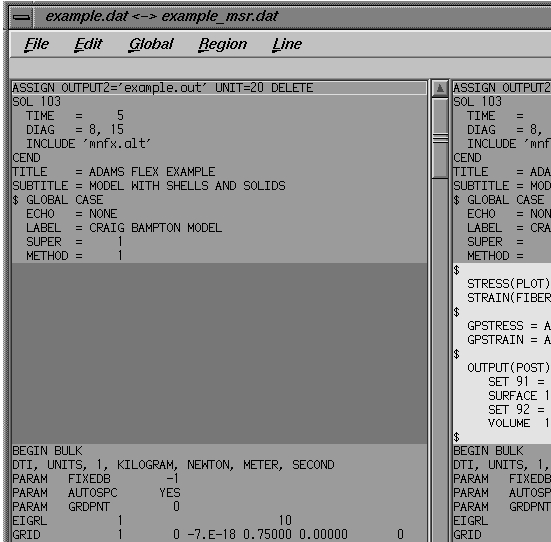
Example above shows the changes that are required in the MSC Nastran input file when the computation and transfer of both stress and strain modes are desired. Because the model contains solid and shell elements, a surface and a volume are defined for computing these grid-point stresses and strains. The surface fiber selected is Z1 and the grid-point stress/strain coordinate system is consistently defined to be the basic FE model system.
Known Limitations, Problems, and Restrictions
■Only one FIBER is output on SURFACE.
■SURFACE or VOLUME should be defined in consistent coordinate (basic) system.
MSC Nastran XDB Support for Stress/Strain Modes
You can store the ortho-normal stress and/or strain modes in XDB file format that are compatible with the mode shapes in the modal neutral file (MNF) and subsequent modal responses from an Adams simulation. The benefits of this capability are:
■Unlimited model size - MSC Patran can access results from an XDB file of any size and with much more efficiency than from an OP2 file.
■MSC Fatigue analysis - Modal coordinates from Adams can be combined with stress or strain modes in XDB file for very efficient MSC Fatigue analysis using modal superposition.
■Element-based support - The XDB file format supports element-based and/or grid-point based stress or strain. Element-based results allow you to perform advanced fatigue analyses such as multi-axial fatigue and weldments.
Learn more:
Creating an XDB File
To create an XDB file with stress or strain modes, add the following entry in the Bulk Data section:
PARAM,POST,0
This is in addition to the necessary commands that are added to Case Control (see Computing MSC Nastran Stress/Strain Modes). In the case of grid point stresses or strain, however, one additional command is required to output grid point stress or strain modes:
STRFIELD = ALL
Note that if you are only interested in working with element-based stress or strain, this command is not needed. For more information on these entries and commands see the, MSC Nastran Quick Reference Guide.
Limitations
■Grid-point strain modes cannot be stored in the XDB nor can MSC Patran post-process them.
■Element-based stress or strain modes cannot be stored in the MNF nor can Adams Durability postprocess them.
Examples
The following are examples of MSC Nastran input decks. See the Case Control section of the MSC Nastran Quick Reference Guide for more information on the AdamsMNF command that is being used in these examples.
Example of Requesting No Grid Point Stress/Strain
In the following example, no grid point stress or strain modes have been requested. Only element-based strain modes have been requested with STRAIN(PLOT) = ALL. These strains will be stored in the XDB (PARAM,POST,0) for postprocessing in MSC Patran or for combining with Adams modal responses from Adams Durability for an MSC Fatigue analysis. This is the most efficient process for obtaining strains for the sole purpose of performing a fatigue analysis. If you are not interested in viewing strains in Adams, there is no need to compute grid-point strain modes nor storing them in the MNF. You will also seea savings in file size and processing time from this. The same is true for stress modes if they are desired over strains.
SOL 103
CEND
AdamsMNF, FLEXBODY=YES, OUTGSTRS=NO, OUTGSTRN=NO
...
STRAIN(PLOT) = ALL
...
BEGIN BULK
...
PARAM,POST,0
...
ENDDATA
Example of Requesting Grid-Point Stress on All Solid Elements
In the following example, grid-point stress (GPSTRESS) modes have been requested on all solid elements (VOLUME). This data, as well as the element-based stress (STRESS) modes, will be stored in the XDB due to the STRFIELD=ALL command and the PARAM,POST,0 card. The grid point stress modes will also be stored in the MNF with the OUTGSTRS=YES option set on the AdamsMNF command. This allows Adams Durability to postprocess stresses on the flexible body in Adams using the modal stress recovery technique.
SOL 103
CEND
AdamsMNF, FLEXBODY=YES, OUTGSTRS=YES, OUTGSTRN=NO
STRFIELD = ALL
...
STRESS(PLOT) = ALL
GPSTRESS = ALL
OUTPUT(POST)
SET 92 = ALL
VOLUME 12 SET 92 DIRECT
BEGIN BULK
...
PARAM,POST,0
...
ENDDATA
Example of Requesting Grid-Point Stress
In the following example, again, grid-point stress modes have been requested. They will not be stored in the XDB, however, because the STRFIELD=ALL command is missing. Therefore, only element-based stress modes will be available in the XDB. Grid-point stress modes will be stored in the MNF because the AdamsMNF option, OUTGSTRS is still set to YES.
SOL 103
CEND
AdamsMNF, FLEXBODY=YES, OUTGSTRS=YES, OUTGSTRN=NO
...
STRESS(PLOT) = ALL
GPSTRESS = ALL
OUTPUT(POST)
SET 92 = ALL
VOLUME 12 SET 92 DIRECT
BEGIN BULK
...
PARAM,POST,0
...
ENDDATA
Shortened Stress/Strain Modes
Shortened stress/strain modes refers to the capability of defining a group or subset of elements in FEA for stress/strain recovery during modal neutral file (MNF) generation. FEA programs allow you to judicially define subregions of your component where stress/strain is of interest. If these subregions are defined during MNF generation, the node length of the stress/strain modes becomes shorter than that for the mode shapes. This reduces the amount of stress/strain data in the MNF, and allows you to avoid doubling the file size when including stress or strain modes. Adams Durability, however, will only be able to recover stress or strain at those subregions.
Support for this capability was first introduced in version 2005. Before 2005, a null tensor (all zero values) would be stored in the MNF for those nodes that did not have stress/strain computed by the FEA program. No reduction in file size was obtained, but worse yet, Adams Durability would report zero stress/strain for those nodes, which could be misleading. In Adams Flex 2005 or greater, it is now possible to remove these zero stress/strain states during MNF optimization. More information on how to do this is provided in the next sections.
Starting in MSC Nastran 2005, only grid point stresses that are computed for a subset of the component are output to the MNF. Support for this capability by the other FEA programs is not yet available.
Learn more:
Note on MNF Compatibility
In general, an MNF is upward, but not necessarily backward, compatible. Adams will always support earlier versions of the MNF. For example, an MNF generated in a version of MSC Nastran before 2005 will be supported. However, an MNF generated by MSC Nastran 2005 or later will be incompatible in a version of Adams earlier than 2005. This is because, by default, MSC Nastran generates a version of the MNF that supports shortened stress/strain modes, or in other words, a reduced MNF. However, an option exists in Adams Flex to convert a reduced MNF to a full MNF, so that it can be processed by earlier versions of Adams.
MNF Translation and Optimization
Support for shortened stress/strain modes is available in the Adams Flex MSC->MNF Translator and MNF->MNF Optimizer through the menu option Stress & Strain Modes. Three options are available as listed in the table below.
The option: | Does the following: |
|---|---|
Sparse | Stores modal stress/strain information only for those nodes for which MSC Nastran had computed stress/strain and stored in the OUTPUT2 file. During MNF optimization, allows you to maintain a reduced MNF. If the original MNF is full, has no effect during optimization. It also has no effect on an MNF that already has shortened stress/strain modes. |
Remove zero entries | Allows you to shorten the stress/strain modes in an MNF by removing stress or strain entries that contain all zero values. Also updates the version of the MNF, so that it is no longer compatible with a version of Adams earlier than 2005. Has no effect on a reduced MNF that supports shorten stress/strain modes. |
Full | Makes the MSC->MNF Translator behave as before by storing modal stress information at every node. Allows you to convert a reduced MNF to one that is full by padding zero values for those nodes that do not have stress/strain defined. This option is useful even if the MNF does not contain stress or strain modes because it converts the MNF to an older version that did not support shortened stress/strain modes. For example, this allows you to convert an MNF that was generated by MSC Nastran 2005 to one that is compatible with an earlier version of Adams. This option has no effect on an older version of the MNF, that is, one that is already full. |
Version Scenarios
For the version: | The scenario is: |
|---|---|
MSC Nastran 2004 | If you have an MNF with stress/strain modes that was generated in MSC Nastran 2004 and you want to reduce it, run the MNF -> MNf Optimimzer with the Stress & Strain Modes option set to Remove zero entries. |
MSC Nastran 2005 | If you have an MNF generated in MSC Nastran 2005 and want to use it in Adams 2003, first convert it by running the MNF->MNF Optimizer with the Stress & Strain Modes option set to Full. |
Example
In this MSC Nastran example, ten shell elements (CQUAD4) are used to model a beam. Grid point strains are requested (GPSTRAIN) on only four of the elements (4,5,6,7) because of the SET 100 specification on the SURFACE card. This results in a reduced MNF with shortened strain modes on grids that are common to those elements (grids 104 through 108 and 204 through 208).
SOL 103
CEND
$
AdamsMNF FLEXBODY=YES,OUTGSTRN=YES,OUTGSTRS=NO
METHOD=300
RESVEC=NO
$
STRAIN(PLOT)=ALL
GPSTRAIN(PLOT)=ALL
OUTPUT(POST)
SET 100 = 4,5,6,7
SURFACE 101 SET 100 NORMAL X3 FIBRE=Z1
$
BEGIN BULK
ASET1,123,101,111,201,211
SPOINT,1001,thru,1003
QSET1,0,1001,thru,1003
DTI,UNITS,1,KG,N,M,S
PARAM,GRDPNT,0
$
EIGRL 300 -1. 3
$
GRID 101 0. 0. 0.
GRID 102 0.05 0. 0.
GRID 103 0.1 0. 0.
GRID 104 0.15 0. 0.
GRID 105 0.2 0. 0.
GRID 106 0.25 0. 0.
GRID 107 0.3 0. 0.
GRID 108 0.35 0. 0.
GRID 109 0.4 0. 0.
GRID 110 0.45 0. 0.
GRID 111 0.5 0. 0.
GRID 201 0. 0.03 0.
GRID 202 0.05 0.03 0.
GRID 203 0.1 0.03 0.
GRID 204 0.15 0.03 0.
GRID 205 0.2 0.03 0.
GRID 206 0.25 0.03 0.
GRID 207 0.3 0.03 0.
GRID 208 0.35 0.03 0.
GRID 209 0.4 0.03 0.
GRID 210 0.45 0.03 0.
GRID 211 0.5 0.03 0.
$
CQUAD4 1 1 101 102 202 201
CQUAD4 2 1 102 103 203 202
CQUAD4 3 1 103 104 204 203
CQUAD4 4 1 104 105 205 204
CQUAD4 5 1 105 106 206 205
CQUAD4 6 1 106 107 207 206
CQUAD4 7 1 107 108 208 207
CQUAD4 8 1 108 109 209 208
CQUAD4 9 1 109 110 210 209
CQUAD4 10 1 110 111 211 210
$
MAT1 1 2.+11 .3 7800.
PSHELL 1 1 .01 1
ENDDATA