MARKER
The MARKER command moves and/or reorients an existing fixed Adams Solver (C++) marker. (See the MARKER statement for more information). You may also list information about the position of the marker.
Format
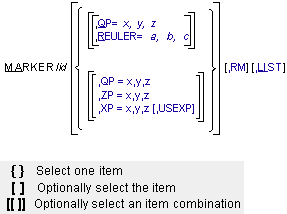
Arguments
LIST | Lists the current values of the MARKER data. The data is with respect to the body coordinate system (BCS) coordinates. |
QP=x,y,z | Redefines the the x-, y-, and z-coordinates of the origin of the MARKER with respect to the PART on which it lies. The coordinates are specified in the body coordinate system (BCS) of the PART to which it belongs. For markers associated with CURVES and SURFACES, the coordinates are specified in the RM coordinate system and are susceptible to change as Adams Solver (C++) iteratively solves for initial conditions that satisfy all constraints while maintaining the marker on the curve. |
REULER=a,b,c | Redefines the three-dimensional spatial orientation of the marker axes relative to the axes of the BCS. For markers associated with CURVES and SURFACES, the orientation is relative to the natural coordinate system of the CURVE or SURFACE. The a, b, and c values represent a set of body-fixed 3-1-3 Euler angles expressed in radians. These angles can be interpreted as follows: ■To orient a marker, first align the marker axes identically to the BCS axes. ■Perform a right-handed rotation of the marker x- and y-axes by a radians about the positive z-axis of the marker. ■Rotate the marker y- and z-axes by b radians about the current marker positive x-axis. ■Perform a right-handed rotation of the x- and y-axes of the marker by c radians about the current z-axis of the marker. This technique can be used to define any arbitrary orientation of the marker relative to the part BCS. To enter the Euler angles in degrees instead of radians, add a D after each value. |
RM | Redefines a reference marker with respect to which Adams Solver (C++) interprets QP, XP, ZP, and REULER. |
USEXP | When using the x-point-z-point method of orientation, USEXP causes the marker to be oriented with the x-axis lying on XP and ZP lying in the positive x-z plane. This is useful to orient markers for use in BEAM statements.Examples of using the ZP, XP and USEXP. |
XP=x,y,z | By default, redefines the BCS coordinates of any point in the positive x-z plane of the marker, but not on the z-axis of the marker. A point on the positive x-axis may be the most convenient. When used with USEXP, XP defines the BCS coordinates of any point on the positive x-axis of the marker. If the marker is associated with a FLEX_BODY or PART, the x-, y-, and z-coordinates are specified in the BCS. For markers associated with CURVES and SURFACES, the x-, y-, and z-coordinates are specified in the natural coordinate system of the CURVE or SURFACE. For every point on a CURVE or SURFACE, Adams Solver (C++) computes a natural coordinate system defined by tangent, normal, and binormal orthonormal vectors. In general, as the solution progresses and the marker moves along the CURVE or SURFACE, the orientation of the natural coordinate system changes, but the orientation of the marker relative to the natural coordinate system remains fixed. The fixed orientation of the marker relative to the natural coordinate system is specified with XP and ZP arguments. Examples of using the ZP, XP and USEXP. |
ZP=x,y,z | By default, redefines the BCS coordinates of any point in the positive z-axis of the marker. When used with USEXP, ZP defines the BCS coordinates of any point in the positive x-z plane of the marker, but not on the x-axis of the marker. If the marker is associated with a FLEX_BODY or PART, the x-, y-, and z-coordinates are specified in the BCS. For markers associated with CURVES and SURFACES, the x-,y- and z-coordinates are specified in the natural coordinate system of the CURVE or SURFACE. For every point on a CURVE or SURFACE, Adams Solver (C++) computes a natural coordinate system defined by tangent, normal, and binormal orthonormal vectors. In general, as the solution progresses and the marker moves along the CURVE or SURFACE, the orientation of the natural coordinate system changes, but the orientation of the marker relative to the natural coordinate system remains fixed. The fixed orientation of the marker relative to the natural coordinate system is specified with XP and ZP arguments. Examples of using the ZP, XP and USEXP. |
Extended Definition
The MARKER command allows you to reposition and/or reorient a fixed marker with respect to the body coordinate system (BCS) of the element to which the marker is attached, or to another nonfloating marker on the same element. You may use any of the standard Adams Solver (C++) methods to specify the location and orientation of the marker. Floating markers may not be moved, but their current information may be listed. For more information on BCS, see Coordinate Systems and Local Versus Global Geometric Data.
After a change to a MARKER, Adams Solver (C++) reprocesses the model at the next SIMULATE command, as if it had just been read in from the dataset. During the reprocessing, Adams Solver (C++) checks the entire model for consistency, reinitializes user subroutines, and recomputes initial conditions.
While checking, Adams Solver (C++) verifies that the model is still valid with the new MARKER positions. If a JOINT is now misaligned, for instance, Adams Solver (C++) issues a warning or error.
Adams Solver (C++) also reinitializes user subroutines to re-establish functional dependencies. For each element that refers to a user-written subroutine, Adams Solver (C++) calls the user-written subroutine with IFLAG set to true.
Prior to the actual simulation, Adams Solver (C++) computes initial conditions for the model. If this is the first simulation, Adams Solver (C++) begins with the positions and velocities specified in the dataset. If you have run a previous simulation, Adams Solver (C++) begins with the final displacements and velocities. Adams Solver (C++) then adjusts the initial conditions to ensure that they are consistent with the model constraints. If this is the first simulation, Adams Solver (C++) also maintains any user supplied joint initial-conditions and positions specified as EXACT.
If you change a MARKER in the middle of a simulation, by default Adams Solver (C++) splits the tabular, request, graphics, and results output into two separate sets of output concatenated together. This ensures that the output correctly reflects the new system geometry.
The OUTPUT/NOSEPARATOR argument prevents Adams Solver (C++) from splitting the file. This allows you to plot or animate the output continuously from beginning to end, but may result in misleading graphics during postprocessing. See the OUTPUT statement for more information on the NOSEPARATOR argument.
Tip: | You can use the QP argument to translate the marker while maintaining the existing orientation. If you use only the REULER argument, Adams Solver (C++) reorients the marker while maintaining the existing position. |
Caution: | ■When reorienting a marker, you should completely specify the necessary information for the selected orientation method. Adams Solver (C++) uses the new orientation information; it does not try to combine it with old information from the dataset statement or a previous command. For example, if you supply ZP but not XP, Adams Solver (C++) uses a default position for the x-axis. Adams Solver (C++) does not use a value of XP from the statement or an earlier command. ■When you change a marker, Adams Solver (C++) updates all elements that depend on that marker. Moving a marker may have subtle effects since many Adams Solver (C++) elements rely on them. Be careful when moving markers as unintended side effects (for example, moving both a joint and force that share a common marker) may occur. |
Examples
MARKER/10,REULER=15D,0,0
This MARKER command reorients marker 10.
MARKER/10,QP=2,15,0
This MARKER command relocates marker 10.
MARKER/10,QP=2,15,0,ZP=3,15,0
This MARKER command relocates and reorients marker 10.
MARKER/18, QP=0,0,0, REULER=0d,0d,0d, RM=8
This MARKER command repositions/reorients Marker 18 so that it has the same location and orientation as Marker 8.
See other bordered commands available.