Basics
Types of User-Written Subroutines
The user-written subroutines are divided into three categories, based on their functionality:
Driver Subroutine
The driver subroutine, CONSUB, drives Adams Solver. It lets you further automate the analysis and modification of Adams Solver models by defining your own sequence of events or data flow within a simulation. It is a very powerful tool, so you will probably not need to use it unless you are an advanced Adams Solver user.
With CONSUB you can issue commands to request, regulate, and vary one or more Adams Solver simulations. Using a CONSUB, you can issue interactive commands to modify a dataset and/or run many different analyses. The most common modes for running Adams Solver simulations are interactive or batch processing, involving a single analysis at a time. Using CONSUB, you can, for example, perform a dynamic analysis of a dataset, vary a statement, and repeat the dynamic analysis.
Evaluation Subroutines
The evaluation subroutines allow you to tailor Adams modeling elements to individual applications. Evaluation subroutines are user-defined elements. Many Adams Solver statements allow you to write subroutines to evaluate nonstandard or complex values for statements (see the table below).
The following table lists the names and definitions for the evaluation subroutines:
Adams Solver Statement/Command: | Subroutines: | Do the following: |
|---|---|---|
CONTROL | Controls an Adams simulation. | |
COUPLER | Defines a user-defined COUPLER. | |
CURVE | Computes curve coordinates and their derivatives for a CURVE statement. | |
DIFF | Defines a user-defined differential-equation value in Adams. | |
FLEX_BODY | Computes the modal damping ratios for a FLEX_BODY statement. | |
FIELD | Computes the force and torque components and their derivatives for a FIELD statement. | |
GFORCE | Computes a set of values for a GFORCE statement. | |
GSE | Used with the GSE statement to compute the current values of the necessary partial derivatives of the states and outputs. | |
MFORCE | Computes the modal force applied by an MFORCE statement. | |
MOTION | Computes the joint displacement, velocity, and acceleration for a MOTION statement. | |
RELOAD | Allows you to reload any information needed to restart user-written subroutines. | |
REQUEST | Computes the output values for a REQUEST statement. | |
SAVE | Allows you to store any information needed to later restart user-written subroutines. | |
SENSOR | Computes a sensed value for a SENSOR statement. | |
SFORCE | Computes the force magnitude for an SFORCE statement. | |
UCON | Computes a constraint value and its derivatives for a UCON statement. | |
VARIABLE | Computes an algebraic value for a VARIABLE statement. | |
VFORCE | Computes force components for a VFORCE statement. | |
VTORQUE | Computes torque components for a VTORQUE statement. |
Restart Subroutines
The two restart subroutines, SAVSUB and RELSUB, allow you to save and reload any data that might be necessary to restart or reinitialize other user-written subroutines following a RESTART command. You only need to use them if other user-written subroutines store data internally from call to call. Unless you use RELSUB and SAVSUB, the internal data is lost when you save a simulation and then later reload it into an Adams Solver run.
The SAVE command allows you to save model and simulation data to a save file. You can then restart a simulation from the saved point, by reloading the save file using the RELOAD command. The SAVE and RELOAD commands do not, however, take any special action to restart user-written subroutines. After a RELOAD, Adams Solver continues calling user-written subroutines just as it would have at the time you saved the file.
For example, if an SFOSUB computes force coefficients when first called and then stores them for later use, they can be lost during a SAVE and RELOAD. You could write a SAVSUB to save the coefficients in the save file and a RELSUB to re-read them, or you could write only a RELSUB to recompute the coefficients. Either way, when you issue a RELOAD command, the SFOSUB regains the proper coefficients.
If, however, an SFOSUB uses only the information that Adams Solver passes through the PAR array and information from utility subroutines, then a SAVSUB and RELSUB are not required because the SFOSUB is not relying on any past data.
Guidelines
The following sections provide general guidelines for writing user-written subroutines:
Subroutine Arguments
User-written subroutines have two types of arguments: input and output.
■Input arguments provide you with the values Adams Solver assigns from information in the corresponding command or statement, or from calculations indicating the current system state. Do not change the values of these input arguments.
■Output arguments provide Adams Solver with information you have derived. Unless explicitly stated otherwise, you should always supply values for output arguments.
Input and output arguments are in lowercase letters to indicate that you can choose any legal FORTRAN variable for the argument name. Input arguments are listed first, followed by output arguments. Because FORTRAN uses argument order to distinguish between arguments, you must not change the order of arguments when passing them to, or when receiving them from, subroutines. Also, for each argument, use a variable of the proper type and dimension. For information on variables, see the next section.
Declaring Variables
To ensure that values are properly transferred between your subroutines and Adams Solver subroutines, you need to declare your subroutine arguments with the same type that Adams Solver uses.
Floating Point Variables
On 64-bit machines (most Linux and Windows machines), Adams Solver uses DOUBLE PRECISION floating-point variables. Because an untyped floating-point variable usually defaults to single-precision (that is, REAL), you must explicitly declare all your floating-point variables to be DOUBLE PRECISION.
Integers
On 64-bit machines, Adams uses 64 bits (integer * 4) to represent integers.
Using Parameters to Make Subroutines More General
Adams Solver always supplies to user-written subroutines the parameter values from the FUNCTION=USER() argument on the corresponding statement or command. If you use FUNCTION=USER (4.0, 5.0, 6.0), for example, Adams Solver passes a PAR array containing the values 4.0, 5.0, and 6.0, and passes NPAR containing the value of 3.
You can use this feature to make your subroutines more flexible. If your calculations depend on the distance between markers 101 and 201, for example, you could write these identifiers directly in your subroutine. If, however, you wanted to change the marker identifiers or use the subroutine with a different model, you would have to edit the FORTRAN file, recompile, and then relink with Adams Solver.
You can avoid these time-consuming changes by putting the marker identifiers in the FUNCTION=USER() argument and then using them as variables in your subroutine. If you want to change them, you only need to change the FUNCTION=USER() argument in your statement or command, then re-run Adams Solver with the same library.
Avoiding Discontinuities
As with run-time expressions, when using a subroutine to define motions, sensors, forces, or state equations in a model, you must ensure that these functions are continuous. Furthermore, when defining displacement-based motions, these functions are expected to be twice differentiable.
Discontinuous functions are difficult to handle because most numerical integration schemes require, and therefore assume, that system equations are inherently continuous. If you violate this rule, Adams Solver could produce unexpected results such as integration failure at the discontinuity. Discontinuous functions are created most often when using IF statements to piece together separate functions. To ensure that the complete function is indeed continuous, be very careful when using this type of logic.
Other discontinuous functions available in the FORTRAN language:
■MIN
■MAX
■DIM
■SIGN
■MOD
Use caution when using these intrinsic functions.
FORTRAN Input/Output Units
If you need to read or write files from your user-written subroutines, use FORTRAN units 90 and above. Adams Solver reserves these units for your use.
Writing Subroutines
To help you create your own user-written subroutines, we have provided subroutine templates in the directory /install_dir/Adams/<Release>solver/usersubs (install_dir is the directory where the Adams products are installed). If you can't find this directory, please contact your system administrator.
User subroutines written in C are also supported. Examples are included in the directory /install_dir/Adams/<Release>solver/samples.
To write a user-written subroutine:
1. Determine which user-written subroutine you need to use. For example, if you have a GFORCE statement, you need to create a GFOSUB user-written subroutine.
2. Determine what you need to calculate, and what the input parameters are. This information determines the information you pass from the FUNCTION=USER() argument in the statement to the subroutine.
3. Copy the appropriate user-written subroutine template from the installation directory to your local directory. The template directory contains all the subroutine templates you might need to use.
4. View the user-written subroutine template using a text editor.
5. Modify the user-written subroutine as desired. You can call a utility subroutine or other FORTRAN or C subroutines from within the user-written subroutine.
6. Save your user-written subroutine. Give the file a descriptive name because you may want to use the same subroutine for different models.
Creating a User Library
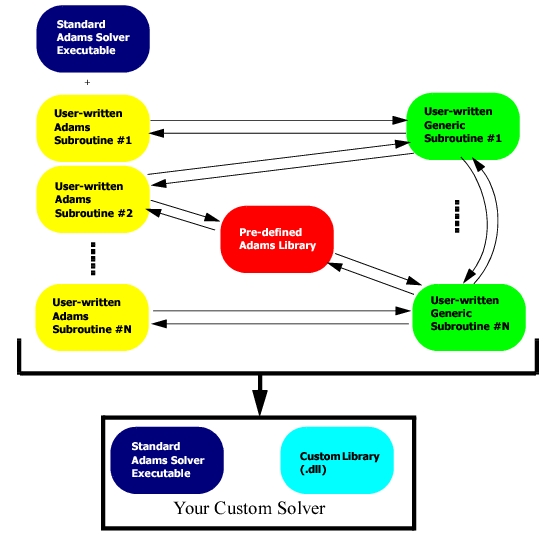
There are three steps for using your own subroutines with Adams:
1. Write your own subroutines and make sure they follow Adams naming and calling sequence conventions.
2. Compile and link in your custom subroutines with the standard Adams library of routines to create a new, dynamically linked, dynamically loaded library (.dll on Windows; .sl, .so on Linux).
3. Use your user library to run your simulations.
Subroutine Arguments
Each Adams subroutine has specific arguments. Some arguments are common to many subroutines. For example:
SUBROUTINE SFOSUB (id, time, par, npar, dflag, iflag, value)
where:
■id - Adams Solver identification number of the statement calling the subroutine (for example, SFORCE/2). Common to all.
■time - Current simulation time. Common to all.
■par - Array of passed parameters. Common to all.
■npar - Number of parameters passed in par. Common to all.
■dflag - Differencing flag indicating that Adams Solver is calling the subroutine to perform numeric differencing (logical variable set to true); typically used for debugging or more advanced management of numeric differencing
■iflag - An integer variable that Adams Solver sets to indicate why the routine is being called:
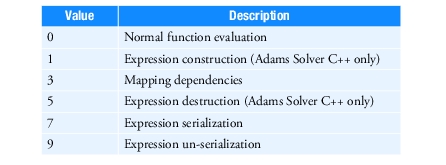
When iflag is 0 Adams Solver calling to compute the value of the user-written variable. When iflag is set to 1 or 3 do any initializations that your subroutine requires.
When your user-defined subroutine has static data that needs to be saved and restored to support the Adams Solver commands Save and Reload, then call the serialization functions for your data when iflag is set to 7, and the un-serialization functions when iflag is set to 9. For more information, see REQUEST, SYSFNC, and SYSARAY Subroutines.
Note: | In simple subroutines where serializing data is not needed, you can declare iflag as a logical variable. In this case you can do any initializations when Adams Solver sets iflag to true, and compute the subroutine's value when Adams Solver sets iflag to false. |
■value - Result(s) returned by the subroutine. Common to all.
Note: | The actual names of the arguments do not matter. For example, value could be called result. It is the order of the arguments that is important. |
Using Multiple Subroutines
You can use multiple subroutines with Adams by linking them together into one user library.
To use multiple subroutines:
1. Create your Adams subroutines.
2. Compile each subroutine individually with the flags specified by Adams, as specified in Compiling Subroutines.
Note: | If source code is supplied, the script will automatically compile the files for you. |
3. Link all object files into one user library. For example:
■On Windows: adams2023_4 cr-user myvarsub.obj yourreqsub.obj –n my_lib.dll
■On Linux: adams2023_4 –c cr-user myvarsub.f yourreqsub.f –n my_lib.so
Here, both object files are linked into one library, my_lib.[dll,so].
Working with Multiple Subroutines of the Same Type
You can use multiple subroutines of the same type with the ROUTINE Argument.
Note: | The template-based (vertical) products, which include Adams Car, and Adams Driveline, use a special dispatcher subroutine that automatically branches for you. The template-based products require different subroutine naming, using numbers in the name (for example, VAR001.f, VAR134.f). The dispatcher subroutine branches based on the name of the subroutine. |
Example
Note the BRANCH_ID indicated in red.
SUBROUTINE VARSUB ( ID, TIME, PAR, NPAR, DFLAG,
& IFLAG, VALUE)
C
C === Type and dimension statements ===================
C
C --- External variable definitions -------------------
C
INTEGER ID
DOUBLE PRECISION TIME
DOUBLE PRECISION PAR( * )
INTEGER NPAR
LOGICAL DFLAG
INTEGER IFLAG
DOUBLE PRECISION VALUE
C
C ID Identifier of calling VARIABLE statement
C TIME Current time
C PAR Array of passed statement parameters
C NPAR Number of passed parameters
C DFLAG Differencing flag
C IFLAG Initialization pass flag
C VALUE The VARIABLE value returned to ADAMS
C
C --- Local variables ---------------------------------
C
DOUBLE PRECISION DISP_TRIG, STIFF_COEFF, STIFF_EXP,
& DAMP_COEFF, PEN_DEPTH, IMPARY(3),
& DISP_Y, VEL_Y, MU, VEL_X, OMEGA_Z,
& SLIP, EPSILON, H0, H1, STPVAL,
& NEG_EPSILON
INTEGER I_MAR, J_MAR, IORD, IPAR(3), NSIZE,
& BRANCH_ID
LOGICAL ERRFLG
C
C === Executable code =================================
C
DISP_TRIG = PAR(1)
STIFF_COEFF = PAR(2)
STIFF_EXP = PAR(3)
DAMP_COEFF = PAR(4)
PEN_DEPTH = PAR(5)
I_MAR = PAR(6)
J_MAR = PAR(7)
MU = PAR(8)
BRANCH_ID = PAR(9)
IORD = 0
EPSILON = 0.1
NEG_EPSILON = -1.0*EPSILON
H0 = 1
H1 = -1
C
IPAR(1) = I_MAR
IPAR(2) = J_MAR
IPAR(3) = J_MAR
NSIZE = 3
CALL SYSFNC('DY', IPAR, NSIZE, DISP_Y, ERRFLG)
CALL SYSFNC('VY', IPAR, NSIZE, VEL_Y, ERRFLG)
CALL SYSFNC('VX', IPAR, NSIZE, VEL_X, ERRFLG)
CALL SYSFNC('WZ', IPAR, NSIZE, OMEGA_Z, ERRFLG)
C
CALL IMPACT(DISP_Y, VEL_Y, DISP_TRIG, STIFF_COEFF, STIFF_EXP,
& DAMP_COEFF, PEN_DEPTH, IORD, IMPARY, ERRFLG )
C
IF (BRANCH_ID .EQ. 1) THEN
C
VALUE = IMPARY(1)
C
ELSEIF (BRANCH_ID .EQ. 2) THEN
C
SLIP = VEL_X+OMEGA_Z*DISP_TRIG
CALL STEP(SLIP, NEG_EPSILON, H0, EPSILON, H1, IORD,
& STPVAL, ERRFLG)
VALUE = MU*IMPARY(1)*STPVAL
C
ELSEIF (BRANCH_ID .EQ. 3) THEN
C
SLIP = VEL_X+OMEGA_Z*DISP_TRIG
CALL STEP(SLIP, NEG_EPSILON, H0, EPSILON, H1, IORD,
& STPVAL, ERRFLG)
VALUE = MU*IMPARY(1)*STPVAL*DISP_TRIG
C
ENDIF
C
RETURN
END
Invoking Subroutines
Some modeling elements allow you to use subroutines to define their behavior. You can invoke user-written subroutines from statements or commands. You have to use pre-assigned names for your custom subroutines so that Adams Solver knows which ones to call, and when.
The table below lists the statements or commands that can reference user-written subroutines and the name of the user-written subroutine(s) they can reference.
To invoke the subroutine: | Use the statement/command: |
|---|---|
CFFSUB, CNFSUB | FRICTION |
CONSUB | CONTROL |
COUSUB, COUXX, COUXX2 | COUPLER |
CURSUB | CURVE |
DIFSUB | DIFF |
FIESUB | FIELD |
GFOSUB | GFORCE |
GSE_DERIV, GSE_UPDATE, GSE_OUTPUT, GSE_SAMP | GSE |
MOTSUB | MOTION |
RELSUB | RELOAD |
REQSUB | REQUEST |
SAVSUB , SEVSUB | SAVE |
SENSUB | SENSOR |
SFOSUB | SFORCE |
UCOSUB | UCON |
VARSUB | VARIABLE |
VFOSUB | VFORCE |
VTOSUB | VTORQUE |
You can call utility subroutines from your user-written subroutine. Utility Subroutines can provide information about the current state of the system to the user-written subroutine.
Compiling, Linking, and Running Libraries
After writing your custom subroutine, you must compile it and link it to Adams to create an Adams Solver user library. Then you can run Adams Solver with that library.
You must have a FORTRAN compiler, since a compiler is not supplied with Adams.
For more information on how to compile and link user subroutines, see Running and Configuring Adams.
Debugging Custom Libraries
If your library does not work as expected, you must debug it. For more information:
■For Windows, see Running and Configuring Adams.
■For Linux or Windows, see the MSC Simcompanion Knowledge Base (http://simcompanion.mscsoftware.com/).
Example - Specifying a User-Written Subroutine
To help you become more familiar with subroutines, we've provided an example involving the GFOSUB subroutine. You can find additional examples in the Adams installation in the subdirectories /solver/usersubs and /solver/samples.
From your dataset, you can refer to user-written subroutines using the FUNCTION=USER argument in a statement. For example, let's assume that you have a GFORCE statement with function expressions that represent the three translational and three rotational vector components of a load at a point. If the force and torque expressions become lengthy and awkward, you can use a GFOSUB user-written subroutine instead of an expression in the GFORCE statement.
Your statement, using function expressions, might look like the following:
GFORCE/5, I=310, JFLOAT=9910, RM=310,
, FX = - 20.0*VX(310,9900,310)/
, FY = - 20.0*VY(310,9900,310)/
, FZ = - 20.0*VZ(310,9900,310)/
, TX = -500.0*WX(310,9900,310)/
, TY = -500.0*WY(310,9900,310)/
, TZ = -500.0*WZ(310,9900,310)
You can replace the above statement with the following statement that requires a user-written subroutine GFOSUB to evaluate the force expressions. Notice how marker IDs are being passed through the parameter list to make the subroutine generic.
GFORCE/5, I=310, JFLOAT=9910, RM=310,
, FUNCTION=USER(20, 500, 310, 9900)
You can then create a GFOSUB user-written subroutine that looks like the following:
SUBROUTINE GFOSUB(ID, TIME, PAR, NPAR, DFLAG,
& IFLAG, RESULT)
C
C === Type and dimension statements ===================
C
C
C - External variable definitions ------------
C
INTEGER ID
DOUBLE PRECISION TIME
DOUBLE PRECISION PAR( * )
INTEGER NPAR
LOGICAL DFLAG
INTEGER IFLAG
DOUBLE PRECISION RESULT(6)
C
C ID Identifier of calling GFORCE statement
C TIME Current time
C PAR Array containing passed parameters
C NPAR Number of passed parameters
C DFLAG Differencing flag
C IFLAG Initial pass flag
C RESULT Array (dimension 6) of computed GFORCE
C components returned to ADAMS
C
C - Local variable and parameter definitions ------
C
DOUBLE PRECISION CT, CR, VEL(6)
INTEGER IPAR(3), IM, JM, NSTATES
LOGICAL ERRFLG
C
C ===Executable code ==================================
C
C Assign readable variable names to passed parameters
C
CT = PAR(1)
CR = PAR(2)
IM = PAR(3)
JM = PAR(4)
C
C Call SYSARY to collect information for the
C calculations below. Note: if IFLAG is not zero, this
C call is actually setting functional dependencies.
C
C - Use VEL to get marker translational and rotational
C velocities
C
IPAR(1) = IM
IPAR(2) = JM
IPAR(3) = IM
CALL SYSARY('VEL', IPAR, 3, VEL, NSTATES, ERRFLG)
C
C - Check SYSARY call through ERRMES utility routine
C
CALL ERRMES(ERRFLG, 'Error calling SYSARY for VEL',
& ID, 'STOP')
C
C - Evaluate GFORCE components -------------
C
RESULT(1) = -CT * VEL(1)
RESULT(2) = -CT * VEL(2)
RESULT(3) = -CT * VEL(3)
RESULT(4) = -CR * VEL(4)
RESULT(5) = -CR * VEL(5)
RESULT(6) = -CR * VEL(6)
C
RETURN
END
Alternatively you can create a "C" GFOSUB user-written subroutine that looks like the following:
#include "slv_c_utils.h"
/*
* Using a function typedef from slv_c_utils.h, please declare your
* user subroutine before defining it. This will allow a compiler to
* perform type checking for your subroutine arguments.
*/
adams_c_Gfosub Gfosub;
/*
* Define a subroutine named 'Gfosub'. Any name is allowed,
* as long as it is mixed case and the name is specified in
* the ADAMS input file using the ROUTINE= keyword.
*
* Adams distinguishes between FORTRAN and C subroutines by looking
* up the function name in the library. If it finds a mixed case
* name then it assumes that the function is a C function. Otherwise
* it assumes Fortran.
*/
void Gfosub(const struct sAdamsGforce* gfo, double time, int dflag, int iflag, double* result)
{
double ct = gfo->PAR[0];
double cr = gfo->PAR[1];
int im = (int)gfo->PAR[2];
int jm = (int)gfo->PAR[3];
double vel[6];
int ipar[3];
int nstates;
int errflg;
/*
Call SYSARY to collect information for the
calculations below. Note: if IFLAG is not zero, this
call is actually setting functional dependencies.
--- Use VEL to get marker translational and rotational
velocities
*/
ipar[0] = im;
ipar[1] = jm;
ipar[2] = im;
c_sysary("VEL", ipar, 3, vel, &nstates, &errflg);
/*
--- Check SYSARY call through ERRMES utility routine
*/
c_errmes(errflg,"Error calling SYSARY for VEL", gfo->ID, "STOP");
/*
--- Evaluate GFORCE components -------------------------
*/
result[0] = -ct*vel[0];
result[1] = -ct*vel[1];
result[2] = -ct*vel[2];
result[3] = -ct*vel[3];
result[4] = -ct*vel[4];
result[5] = -ct*vel[5];
}
Unsupported Subroutines
Although Adams Solver continues to recognize many unsupported subroutines, new subroutines have made some of them obsolete. The use of unsupported subroutines is discouraged as they may be removed from future Adams Solver releases without notice.
This release of Adams Solver no longer supports the following subroutines available in previous releases:
GSESUB
GSEXX, GSEXU, GSEYX, GSEYU