Using FTire Tire Model
Learn about:
This help describes the Flexible Ring Tire Model (FTire)™, as it is invoked from Adams.
© Michael Gipser, cosin scientific software AG
About FTire
The tire model, FTire (Flexible ring tire model), is a sophisticated tire force element. You can use it in MBS-models for vehicle-ride comfort investigations and other vehicle dynamics simulations on even or uneven roadways.
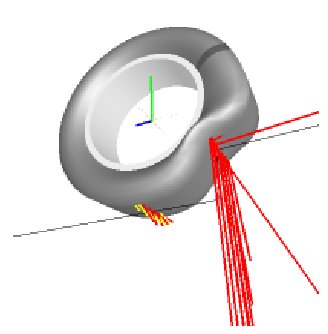
The main benefits of FTire are:
■Fully nonlinear.
■Valid in frequency domain up to 120 Hz, and beyond.
■Valid for obstacle wave lengths up to half the length of the contact patch, and less.
■Parameters, among others, are the natural frequencies and damping factors of the linearized model, and easy-to-obtain global static properties.
■Models both the in-plane and out-of-plane forces and moments.
■Computational effort no more than 5 to 20 times real time, depending on platform and model level.
■High accuracy when passing single obstacles, such as cleats and potholes.
■Applicable in extreme situations like many kinds of tire misuse and sudden pressure loss.
■Sufficiently accurate in predicting steady-state tire characteristics.
We recommend that you visit https://www.cosin.eu/, to learn more about FTire theory, validation, data supply, and application. Also, at the FTire Web site, you will be kept informed about the latest FTire improvements, and how to receive them. In the download section, you will find a set of auxiliary programs, called FTire/tools for Windows™. These tools help to analyze and parameterize an FTire Model. FTire/tools is free for FTire licensees. It comprises static, steady-date, and modal analysis, linearization, data estimation, identification and validation tools, road data visualization, and more. In the site's documentation section, you will find a more detailed and permanently updated FTire documentation, together with as some additional literature.
Installation of FTire
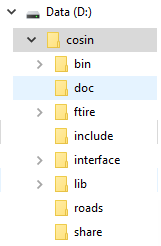
The cosin software for FTire needs to be installed separately. After the installation, the environment variable COSIN_PREFIX needs to be defined. The COSIN_PREFIX should point to the location of the FTire installation. For example, for the lower installation
COSIN_PREFIX=d:/cosin
Using FTire with Road Models
FTire supports all MSC road definitions, including Motorsports and all 3D roads. It also supports several customer-specific and third-party roads. For more information about available road descriptions, please contact info@cosin.eu.
Using FTire with Adams
FTire is a high-resolution tire model, with respect to road irregularities and tire vibration modes. To take full advantage of that precision, we recommend that you choose a small step size for the Adams integrator. There should be a minimum of 1,000 steps per one second simulation time (that is, an output time step of 1 ms or less).
Controlling integrator step size in:
Controlling Integrator Step Size in Adams Car
In Adams Car, you can control the integrator step size by selecting:
Settings → Solver → Dynamics
and entering 1ms in the Hmax text box.
Alternatively, you can edit the driver control file (.dcf) that Adams Car automatically generates when performing a new dynamic maneuver. In that file, override the integrator step size, which is defined in [EXPERIMENT] block, by entering the value 0.001 or less. After editing the file, you can launch subsequent simulation experiments with the same driver's control (and, of course, the new integrator step size) by selecting the following from Adams Car:
Simulate → Full-Vehicle Analysis → DCF Driven → Driver Control Files → Browse
and selecting the .dcf you just edited.
Controlling Integrator Step Size in Adams View
In Adams View, you can control the integrator step size by checking:
Settings → Solver → Dynamics → Customized Settings
size, Min Step Size, and Max Step Size.
Controlling Integrator Step Size in Adams Solver
In Adams Solver, you can control the integrator step size by setting INTEGRATOR/HMAX to the desired value in the Adams dataset (adm).
Velocity error control
Without velocity error control (for example, I3 formulation), it may occur that differentiation of the rim orientation angle leads to inconsistent velocities at a specific Solver integration step (rim angular velocity passed over to CTI is inconsistent). Using the SI2 formulation (enforces velocity error control) will reduce occurrence of this inconsistency.
Note: | FTire requires that the tire vertical direction is parallel to the global z-axis in your model. |
FTire Animation
A detailed FTire animation including tire and road deformations can be overlaid on the Adams animation in Adams PostProcessor.
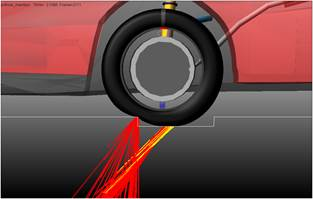
The FTire wheel/tire forces and deformations are stored in an .ogl file, and road deformation is stored in an .rgu file. More information about how to create the Cosin animation files and how to overlay the FTire animation files can be found in Adams PostProcessor → Animation Dashboard - Tire/Road.
Choosing FTire Operating Conditions
The tire operating conditions can be changed using the cosin tools component, see Adams Car → Simulate, Component Analysis → cosin/tools:
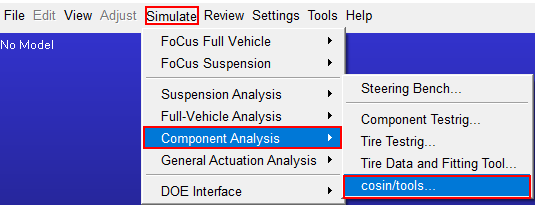
For using the cosin tools, please explore the manual at the cosin website, www.cosin.eu
Note: | If you use the preprocessed data file in subsequent simulations, don't forget to copy the [operating_conditions] section from the basic data file manually into the preprocessed data file. This is not done automatically, because tire operating conditions are not considered to be part of the tire data. |
Statics with FTire
FTire will support the statics and quasi-statics calculations of the Adams Solvers. The keyword 'statics_accuracy' has several settings to improve the statics calculation, see the FTire documentation at www.cosin.eu.
There is one known restriction: FTire may have difficulty to calculate statics when the vehicle is standing on an overpass road or viaduct (RGR format).
FTire support for DOE
Since version 2.11 (rev 2405) of Ftire, FTire allows the user to define a set of parameters p1, p2, and so on in the FTire property file that can be used in any arbitrary expression for FTire parameters. Adams Car supports this functionality by creating an array for each tire containing these parameters and which are then referenced by Adams View Design Variables. These Design Variables can be used in for example, Adams Insight to change FTire properties in design of experiments studies.
An example tire property file (acar/shared_car_database.cdb/tires.tbl/ftire_205_55R16_doe.tir) is included in the Adams Car database. The section [DOE_PARAM] in the FTire property file contains the parameters which can be used in expressions for FTire parameters as shown below:
…
$----------------------------------------------------------DOE_PARAM
[DOE_PARAM]
p1 = 5.0
…
$----------------------------------------------------------------DATA
[FTIRE_DATA]
$........................static and modal data for 1st infl. Pressure
first_deflection = p1*2 $ mm
…
Creating a tire in Adams Car, the ac_tire UDE creates Adams View Design Variables based on the [DOE_PARAM] section in the tire property file. For each tire, an array is created which references the Design Variables. This array (referenced by the 17th element of the tire input array) is passed to the FTire model via the Adams Tire interface and allows changing FTire parameters from the Adams dataset.
Example doe array:
Object Name | : .MDI_Demo_Vehicle.TR_Front_Tires.til_wheel.doe_array |
Object Type | : Numbers ADAMS_Array |
Parent Type | : ac_tire |
Adams ID | : 902 |
Numbers | : 5.0 (.MDI_Demo_Vehicle.TR_Front_Tires.til_wheel.doe_p01) |
The design variables (for example, .MDI_Demo_Vehicle.TR_Front_Tires.til_wheel.doe_p01) can be used in for example, Adams Insight to perform studies varying FTire properties.
Inflation Pressure during runtime
The inflation pressure of the tire can be varied by defining a Solver expression in [bar] in the Modify Wheel dialog (right-click on the wheel in the Adams Car GUI and select 'Modify') as shown below. A negative value means that the inflation pressure will be taken from the tire property file. This option is currently only available for FTire (and verified with Cosin 2023-3 and Cosin 2023-4).
The function expression is stored in the Adams Car subsystem.
The function expression is stored in the Adams Car subsystem.
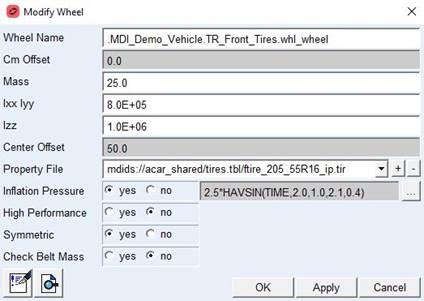
Note: | The inflation pressure does not change if you have ‘inflation_pressure’ defined in your tire property file under [OPERATING_CONDITIONS]. An example tire property file ftire_205_55R16_ip.tir can be found in acar_shared/tires.tbl. |
FTire Modeling Requirements and Checklist
Compared to the standard Adams Tire models, FTire has a few additional requirements for your simulation model, the most important ones are:
■The global z-axis in you model must be parallel to the gravity vector.
■The maximum integrator step size (HMAX) must be smaller than 0.001 second.
Further detail requirements and items to check in your model can be found in the FTire support checklist, https://www.cosin.eu/wp-content/uploads/ftire_support_checklist.pdf.
Cosin Tire Interface
To further improve tire models such as FTire, especially in combination with complex road models, the Cosin Tire Interface (CTI) was implemented in Adams Tire and is now used as the default tire interface for FTire. The CTI will exist in parallel to the STI (Standard Tire Interface) which is the default interface for the other Adams Tire models. Compared to using the FTire STI implementation, the CTITIRE interface directly calls the cti functions (see reference below) which allows more flexibility instead of using a TYRSUB routine (see section Creating Tire Models for STI) with a fixed argument list which in turn calls the cti functions.
The current implementation of the CTI will be able to utilize more tire/road states and features FTire multi-part road contact modeling. In general all tire models predict tire-road interaction forces for one tire-road contact combination (just one road can be used for each tire). The multi-part road contact offers the possibility of FTire to have contact with multiple road parts.
Setting the following environment variable will activate the STI interface for FTire instead of using the (default) CTITRE interface: MSC_ADAMS_USE_CTI = "NO".
The following messages are then printed in the Adams Solver message file:
OS-environment detected: MSC_ADAMS_USE_CTI=NO
Adams FTire will use the STI Tire interface when set to 'NO'.
CTITIRE: STI interface is used
To change back to the CTITIRE interface for FTire, set the environment variable as follows: MSC_ADAMS_USE_CTI="YES". The following messages are then printed in the Adams Solver message file:
OS-environment detected: MSC_ADAMS_USE_CTI=YES
Adams FTire will use the STI Tire interface when set to 'NO'.
If the environment variable MSC_ADAMS_USE_CTI is not set (default), the CTITIRE is used for FTire and no message is printed in the Adams Solver message file.
More details about the Cosin Tire Interface can be found in the Cosin Tire Interface API Reference and User's Guide at https://www.cosin.eu/wp-content/uploads/cti.pdf.
Using the FTire Soft Soil model
The FTire Soft Soil model requires the Cosin ftsoil license. To set the license from within Adams Car, Select Simulate → Component Analysis → cosin/tiretools → license.
To use the FTire Soft Soil model, soil properties have to be added to the Regular Grid Road (.rgr). The following shows an example of soft soil patch (.rgr) using the Bekker approach for describing soft soil:
$RGR_data lu=m xmin=-2 dx=0.005 nx=201 xextr=0 ymin=0.2 dy=0.005 ny=201 max_sink_vel=2 soil_model=bekker soil_type_1=soft_soil !
The grid mesh (dx, dy) should not be too small as FTire's resolution is automatically adapted to the .rgr step size. A minimum grid size of 5x5mm is reasonable with respect to accuracy and computing time.
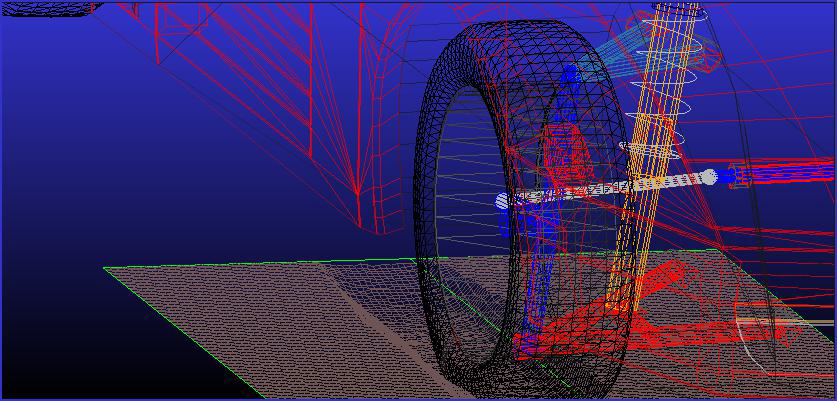
It is recommended to use Cosin/Tools provided by Cosin scientific software to create soft soil roads. For starting the Cosin/Tools within Adams Car, Select Simulate → Component Analysis → cosin/tiretools.
More details about the pressure-sinkage and shear strength parameters for the various soil types used in FTire and based on the Bekker formulation can be found in the following reference:
S.G. Mao, Ray P.S. Han, "Nonlinear complementarity equations for modeling tire-soil interaction - An incremental Bekker approach", Journal of Sound and Vibration 312 (2008) 380-398.
More information about the Cosin soft-soil models can be found in the Cosin Road Modeling Documentation at http://www.cosin.eu
Live Animation in Adams View
To turn on the Cosin live animation during the simulation, the following keyword must be set in the [MODEL] section of the tire property file:
separate_animation = 1
It is strongly recommended to use Cosin/Tools (run <install_dir>/cosin/cosin.exe or select Simulate → Component Analysis → cosin/tool in Adams Car) to update this parameter or any other setting in the FTire property file.
Important: | Do not manually edit the Cosin software configuration file cosin.ini located in your home directory. In case of any FTire issues, it may help to remove the cosin.ini file and to re-create it by simply running Cosin/Tools again. |
Live Animation and post processing in Adams Car
The cosin Live Animation can be controlled by Settings - Solver - Display - Cosin Live Animation, see below:
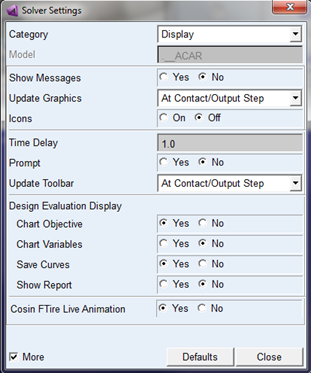
For using the Ftire animation within the Adams Postprocessor (Animation Dashboard - Tire/Road), switch on the output of the .ogl file:
Settings - Solver - Output - Cosin Animation File (.ogl), see below:
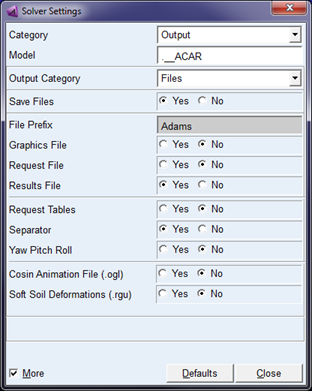
When using the FTire soft soil modeling (separate license required), the soft soil deformations can be visualized in the Adams Post Processor when .rgu file is generated (Settings - Solver - Output - Soft Soil Deformations (.rgu)).
The Ftire output can also be controlled from the Adams Dataset using the 'cfinit' consub in the Adams Command File (.acf):
control/routine=abgTire::cfinit,func=user(2, idString, rguSwitch, oglSwitch, laSwitch)
with:
idString | id of the string with the simulation prefix name |
rguSwitch | rgu will be generated when set to 1 (off 0) |
oglSwitch | ogl will be generated when set to 1 (off 0) |
laSwitch | Live Animation will be shown when set to 1 (off 0) |
Note: | The separate_animation keyword in the tire property file is not supported in Adams Car, unless the dfinit consub is removed from the .acf file. |
Updating FTire from cosin website
At a regular basis cosin scientific software (see at www.cosin.eu) provides updates of the FTire code and related tools. Though these download versions are not fully tested in conjunction with all Adams products and MSC Software Corporation therefore cannot support this use case, a method is available to use a downloaded version without changing or destroying your version in the Adams release.
In general a download from the cosin scientific software website contains a full package of all Cosin's FTire related software. When installing a downloaded package and setting the environment variable 'COSIN_PREFIX' to the root of the installed Cosin package, Adams Tire will use the FTire available under the 'COSIN_PREFIX' path.
FTire HIL with Adams
The implementation of the CTI interface in Adams has been extended by the multi-threading extension of the CTI interface as provided by Cosin. This allows to run multiple tire instances in parallel which can save a significant amount of computing time on multi-core systems and allows for real time simulations using vehicles equipped with FTires.
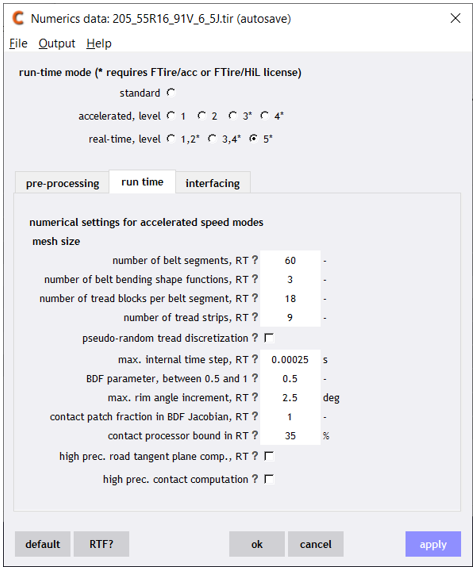
In order to run FTire HIL in Adams Real Time you need to have an FTire property file in which the run-time mode is set to an appropriate real time level. This can be done in cosin/tools (Adams Car GUI → Simulate → Component Analysis → cosin/tools). An example is shown below.
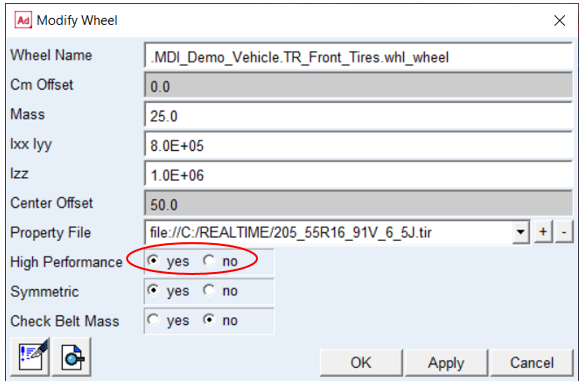
Next, you need to select the 'High Performance' mode in the Modify Wheel dialog (right-click on the wheel in the Adams Car GUI and select 'Modify') as is shown below. This will instruct the Adams CTI interface to set the multi-threaded call flag mt_call_flag in the CTI interface to 111 (1.. hardware-in-the-loop application, .1. default affinity handling is disabled, ..1 multi-threaded) and to use multi-threaded CTI functions.
In order to run FTire in real time, each FTire HIL entity needs to run on a dedicated thread. To set the thread affinity, use environment variable MSC_ADAMS_TIRE_AFFINITY. For example, MSC_ADAMS_TIRE_AFFINITY='17,18,19,20' means that CPU nr 17 is used for the 1st FTire, CPU nr 18 for the 2nd FTire, and so on.
The Adams model is now prepared to run FTire HIL. To run in, for example, Simulation Workbench you need to create an FMU. See Getting Started with Adams Real Time for more information about how to do this.
You also need an FTire HIL license to run FTire in real time. You can use environment variable COSIN_LMSERVER to specify the FTire HIL license, for example, COSIN_LMSERVER="/root/cosin/OLicense.olixml".
The FTire CTI interface supports Extended Parallelization to further speed up the model for real time simulations, see Running with Extended Parallelization for more information. Similar as for real time simulations without Extended Parallelization, you need to set environment variable MSC_ADAMS_TIRE_AFFINITY to ensure that each FTire runs on a dedicated thread.
In order to simulate FTire on a VI-Road (VI-Grade), the VI-Road property file reference needs to be provided through environment variable VIDRIVESIM_ROAD_PROPERTY_FILE or ADAMS_ROAD_PROPERTY FILE. Only then .rga files are created which are read by FTire to simulate such types of roads. The .rga file contains the road_data_file reference, patch_length (default: 0.3) and number_grid_points_in_one_dir (default: 50). Default values can be overwritten by specifying environment variables MSC_ADAMS_FTIRE_PATCH_LENGTH and MSC_ADAMS_FTIRE_GRID_POINTS.
You can use environment variable VIDRIVESIM_ROAD_PROPERTY_FILE or ADAMS_ROAD_PROPERTY FILE to change road property file without changing the Adams model files. This will allow you to quickly change road property file, for instance in Simulation Workbench.
Note: | Both MSC_ADAMS_FTIRE_HIL_AFFINITY and MSC_ADAMS_TIRE_AFFINITY can be used to set the affinity of the CTI based tires. It is however recommended to use MSC_ADAMS_TIRE_AFFINITY as it can be used for both CTI (such as FTire) and STI (such as PAC2002) based tires. |
Note: | For more information about the CTI interface, please see the Cosin website 'cosin.eu/support/documentation' document 'Cosin Tire Interface (CTI): API reference and documentation'. |