Discrete Flexible Link
Ribbon menu → Bodies Tab → Flexible Bodies container → Discrete Flexible Link 
or
(Classic) Build → Flexible Bodies → Discrete Flexible Link
Creates a discrete flexible link consisting of two or more rigid bodies connected by beam force elements.
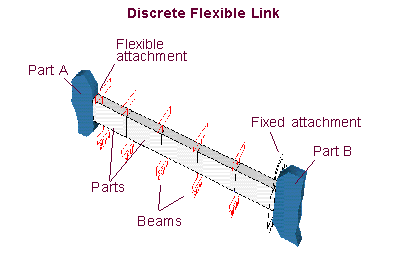
You indicate the following and Adams View creates the appropriate parts, Geometry, Forces, and Constraints at the endpoints:
■Endpoints of the link
■Number of parts and the material type
■Properties of the beam
■Types of endpoint attachments (flexible, rigid, or free)
Learn about working with Discrete Flexible Links.
Note: | For more information on beam force elements, see Beam. Also note the caution about the asymmetry of beams. |
For the option: | Do the following: |
|---|---|
Tips on Entering Object Names in Text Boxes. | |
Name | Enter a text string of alphanumeric characters. Adams View prepends the text string you specify to the name of each object it creates. For example, if you specify the string LINK, the first rigid body is LINK_1, the first marker is LINK_MARKER_1, and so on. |
Material | Enter the type of material to be used for the rigid bodies and beam properties. Learn about Standard Material Properties. |
Segments | Enter the number of rigid bodies that you want in the link. |
Damping Ratio | Enter the ratio of viscous damping to stiffness for the beam forces. |
Color | Enter the color to be used for the geometry in the flexible link. |
Marker 1 | Enter the marker that defines the start of the link. Learn about Positioning Flexible Links. Note: Marker 1 and Marker 2 are also used to calculate the orientation of the link. |
Attachment | Select how to define the start of the link: ■free - The end is unconnected. ■rigid - A fixed joint is created between the parent of Marker 1 and the first part of the discrete flexible link. ■flexible - The link has discrete flexibility all the way to the endpoint. To create this flexibility, Adams View creates an additional beam force between the first segment of the link and the parent part of Marker 1. The length of the beam is one half of the segment length. |
Marker 2 | Enter the marker that defines the end of the link. |
Cross Section | Select one of the following to define the geometry of the link or specify the area and area moments of inertia of the flexible link. |