Spline Tool
Ribbon menu → Bodies tab → Construction container → Spline Tool 
or
(Classic) Build → Bodies/Geometry → Spline Tool
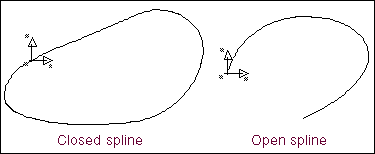
Creates a spline, which is a smooth curve that a set of location coordinates define.
You create splines by defining the locations of the coordinates that define the curve or by selecting an existing geometric curve or edge and specifying the number of points to be used to define the spline. The Spline tool produces a smooth curve through the points.
You can also close the spline or leave it open. A closed spline must be composed of at least eight points; an open spline must be composed of at least four points.
Tip: | You can also create a spline in the following ways: ■Creating and Modifying Data Element Splines |
Learn about Creating Splines.
For the option: | Do the following: |
|---|---|
New Part/Add to Part/On Ground | Select either: ■New Part - Creates a new part. ■Add to Part - Adds the spline to another part in your model. ■On Ground - Adds the spline to ground. Note: Add geometry to ground if the geometry does not move or influence the simulation of your model. For example, if you are simulating a car driving around a race track, the geometry that defines the race track can be added to ground. |
Closed | Select if you want to create a closed spline. Note that it must contain eight points. Note: You can extrude a closed spline into solid geometry that has mass. For more information, see the Extrusion Tool. |
Create by Picking | Select: ■Points to select the locations on the screen where you want the spline to pass through. You must specify at least eight locations for a closed spline and four locations for an open spline. ■Curve to select the curve to define the spline. ■Edge to select the edge to define the edge. |
If you selected Curve or Edge for Create by Picking, you have one additional option: | |
Spread Points | Set how many points you want used to define the curve or clear the selection and let Adams View calculate the number of points needed. Note: If you are using this tool from the Main toolbox, the Spread Points text box is called # of Points. |
Notes: | Adams View places hotpoints at locations on the spline as you draw it. The hotpoints let you reshape the spline. For more information on modifying geometry using hotpoints, see Using Hotpoints to Graphically Modify Geometry. You can also modify the spline by editing the point locations directly or by changing the curve and matrix data elements that Adams View creates to support the spline. In addition, you can change the number of segments that Adams View creates through the spline. For more information on modifying splines, see Using Dialog Boxes to Precisely Modify Geometry. |