Output Files on Disk
An Adams Acoustics analysis places a number of folder and files into a subfolder of the Adams working directory named after the acoustics analysis. These are described below.
Time Domain Analysis: Main Directory
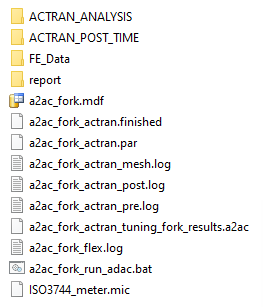
■.mdf: modal deformation file (MDF) output from Adams to be used as in input to Actran describing the motion of the flexible body during the Adams analysis.
■.finished: used by software for job status, no user consumption intended
■.par: file containing all parameters defined by the user in the Acoustics plugin interface in Adams View. This file is used by Actran as input to create meshes, analysis, run, post-processing. See content of run_adac.bat file for advanced usage.
■*.log: status logs from the Actran processes that performed the meshing, solving and generation of the plots on disk
■.a2ac: "Adams to Actran" file; this can be used to manually launch the automated plot generation in the Adams PostProcessor Acoustics Dialog.
■run_adac.bat: batch file used by Windows to launch the Actran jobs
■.mic: file specified by the user to define the locations in space of the microphones. The default is "ISO3744_meter.mic" included with the installation. See the Far Field Tab section for more information.
Time Domain Analysis: ACTRAN_ANALYSIS
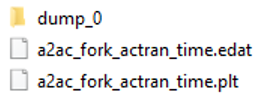
■dump: Directory Output by Actran time domain simulation. Used for Actran restart (not applicable for current Adams/Actran usage).
■.edat: Actran analysis input file. Contains all parameters to run the Actran simulation. Can be opened in Actran VI.
■.plt: Actran results file. Contains local and global indicators. Can be open in Actran PLTViewer and WaterfallViewer for post-processing.
Time Domain Analysis: ACTRAN_POST_TIME\SPL_FREQ
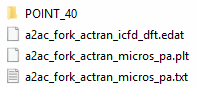
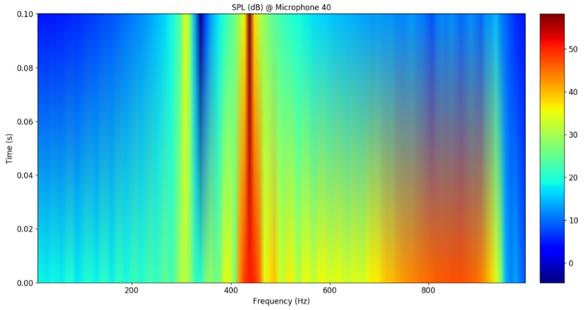
POINT_*: folders containing image files (.png) of all the microphone-specific plots generated by Actran and containing text files (.txt) of the raw data used to create them. Note: these same data are plotted via the automated process launched from Adams PostProcessor, but these Actran-generated plot images have formatting differences in some cases. For example, the Sound Pressure Level (SPL) vs. Frequency across Time Slices in this folder is a 2D colormap whereas in Adams Post Processor it is plotted as a 3D surface.
■.edat: Actran analysis input file used to compute the Discrete Fourier Transform of Time domain results.
■.plt: Actran results file of Discrete Fourier Transform. Contains results in frequency domain for all microphones requested by user.
■micros_pa.txt: Time domain pressure at all microphones requested by user. Used as input for DFT.
Time Domain Analysis: ACTRAN_POST_TIME\TIME

■ALL: folder containing image files (.png) of the non-microphone-number-specific plots generated by Actran and containing text files (.txt) of the raw data used to create them. Note these same data are plotted via the automated process launched from Adams PostProcessor, but these Actran-generated plot images have formatting differences in some cases.
■POINT_*: folders containing image files (.png) of all the microphone-specific plots generated by Actran and containing text files (.txt) of the raw data used to create them. Note these same data are plotted via the automated process launched from Adams PostProcessor, but these Actran-generated plot images have formatting differences in some cases. Also included in this folder is the .wav sound file for the give microphone.
Time Domain Analysis: FE_DATA
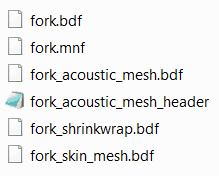
This folder contains the Finite Element (FE) files generated by the automated pre-processing done for the acoustics analysis. This folder is generated if the "Export FE Data" checkbox is selected on Adams Acoustics dialog common area.
■.bdf: structural mesh generated from input .mnf.
■.mnf: The Adams modal neutral file used for the flexible body that was the subject of the acoustics analysis
■acoustic_mesh.bdf: mesh file containing the acoustic mesh (shrinkwrap, volume mesh and infinite domain)
■acoustic_mesh_header.bdf: contains acoustic mesh parameters for setup of the infinite elements (far field)
■shrinkwrap.bdf: mesh which couples the structure (Adams flexible body) to the acoustic volume mesh
■skin_mesh.bdf: skin mesh of the structure (MNF) generated by Adams Flex that is used to generate the shrinkwrap.bdf
Time Domain Analysis: report
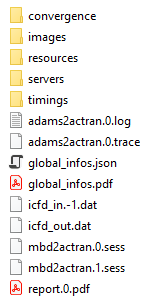
This folder contains many files and sub-folders of statistics about the Actran solver job and the environment on which it was run. These may be useful in conversations with MSC technical support in diagnosing any issues with the acoustics analysis.
Frequency Domain Analysis: Main Directory
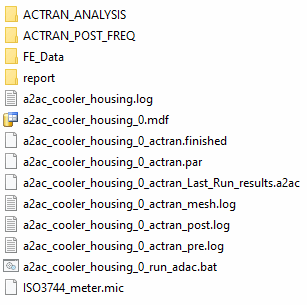
■.mdf : modal deformation file (MDF) output from Adams to be used as in input to Actran describing the motion of the flexible body during the Adams analysis.
■.finished: used by software for job status, no user consumption intended
■.par: file containing all parameters defined by the user in the Acoustics plugin interface in Adams View. This file is used by Actran as input to create meshes, analysis, run, post-processing. See content of run_adac.bat file for advanced usage.
■*.log: status logs from the Actran processes that performed the meshing, solving and generation of the plots on disk
■.a2ac: "Adams to Actran" file; this can be used to manually launch the automated plot generation in the Adams PostProcessor Acoustics Dialog.
■run_adac.bat: batch file used by Windows to launch the Actran jobs
■.mic: file specified by the user to define the locations in space of the microphones. The default is "ISO3744_meter.mic" included with the installation. See the Far Field Tab section for more information.
Frequency Domain Analysis: ACTRAN_ANALYSIS
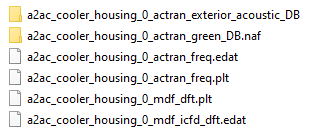
■actran_exterior_acoustic_DB: adaptive meshes created for Finite Element simulation. Meshes are ordered by frequency range as per requested in Analysis parameters Tab 6.
■actran_green_DB.naf: Actran Green analysis database. Can be used manually for Restart capabilities if only MDF file is changing.
■.edat: Actran analysis input file. Contains all parameters to run the Actran simulation. Can be opened in Actran VI.
■.plt: Actran results file. Contains local and global indicators. Can be open in Actran PLTViewer and WaterfallViewer for post-processing.
Frequency Domain Analysis: ACTRAN_POST_FREQ

■SPL: stores Sound Pressure Level results from the Acoustics analysis. This folder contains subfolders each containing image files (.png) of all the microphone-specific plots generated by Actran and containing text files (.txt) of the raw data used to create them. Note these same data are plotted via the automated process launched from Adams PostProcessor, but these Actran-generated plot images have formatting differences in some cases.
■SWL: stores Sound Power Level results from the Acoustics analysis. These are images (.png) of the non-microphone-number-specific plots generated by Actran and containing text files (.txt) of the raw data used to create them. Note these same data are plotted via the automated process launched from Adams PostProcessor, but these Actran-generated plot images have formatting differences in some cases.
Frequency Domain Analysis: FE_DATA
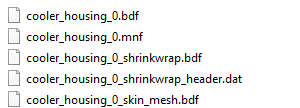
This folder contains the Finite Element (FE) files generated by the automated pre-processing done for the acoustics analysis. This folder is generated if the "Export FE Data" checkbox is selected on Adams Acoustics dialog common area.
■.mnf: The Adams modal neutral file used for the flexible body that was the subject of the acoustics analysis
■acoustic_mesh.bdf: mesh file containing the acoustic mesh (shrinkwrap, volume mesh and infinite domain)
■acoustic_mesh_header.bdf: contains acoustic mesh parameters for setup of the infinite elements (far field)
■shrinkwrap.bdf: mesh which couples the structure (Adams flexible body) to the acoustic volume mesh
■skin_mesh.bdf: skin mesh of the structure (MNF) generated by Adams Flex that is used to generate the shrinkwrap.bdf
Frequency Domain Analysis: REPORT
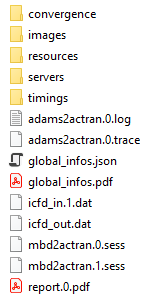
This folder contains many files and sub-folders of statistics about the Actran solver job and the environment on which it was run. These may be useful in conversations with MSC technical support in diagnosing any issues with the acoustics analysis.