Verifying Flexible Bodies
After you've imported a flexible body into Adams View, you might want to verify that the flexible body translated correctly. You can check it two ways:
We also provide an Example of Using Adams Linear to Verify Flexible Bodies.
Using the Info Tool to Verify Flexible Bodies
The Info tool in Adams View lets you check the units and mass of a flexible body. The following shows the information displayed about a flexible body when you select the Info tool. Learn more about using the Info Tool.
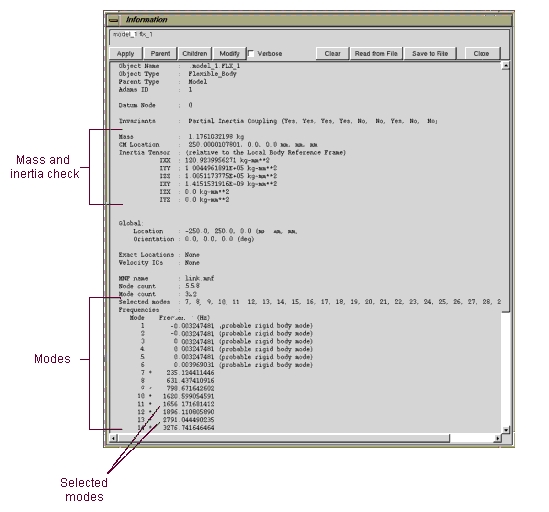
Information About a Flexible Body
To display information about a flexible body displayed on the screen:
1. Right-click the body on the screen. You may want to zoom in on the body on the screen to more easily place the cursor over just that object.
2. From the shortcut menu that appears, select Info.
To use the Database Navigator to display information about flexible bodies:
1. Double-click the background of the Adams View main window to clear any selections.
 .
. The Database Navigator appears.
3. Select the flexible body that you want to display information about. Learn about Showing, Hiding, and Selecting Objects in the Database Navigator.
4. Select OK.
Using Adams Linear to Verify Flexible Bodies
You can use Adams Linear, an optional add-on module to Adams View, to help you verify that your flexible body translated correctly to Adams View and to gauge how many modes must be included in Adams View. To purchase Adams Linear, see your MSC Software sales representative.
You usually have two questions when working with flexible body modeling:
■Was the FE model to Adams translation process successful?
■How many modes must be included in the Adams simulation?
Adams Linear is an excellent tool for answering these questions. To answer the questions using Adams Linear, you simply create a model containing only the flexible body and constrain it to ground in a way that is similar to how the flexible body will be constrained in the final model.
You then run Adams Linear and record the natural frequencies. You compare the natural frequencies that Adams Linear found to those that the FEA program predicted for the same set of constraints. Unless the FEA translation process failed in some way (for example, units were misrepresented) or there is an inadequate number of modes, the natural frequencies should match.
You can also use this process to help you disable modes by finding which modes do not contribute significantly to important natural frequencies. You may find it useful to repeat this process for several joint configurations.