Overview of Creating User Tire and Road Models
This section of the help explains how to create your own tire models for use with Adams Tire. To use this help, you must have:
■Intermediate proficiency using Adams Solver, Adams Car, or Adams View.
■Ability to compile and link user-written subroutines with Adams Solver to build an Adams Solver user library.
■Advanced knowledge of tire mechanics and tire modeling.
■Basic knowledge of FORTRAN or C programming.
■Access to a source code debugger.
You can create tire or road models that extend the capabilities of Adams Tire to better meet your needs. Adams Tire offers two types of interfaces that can be used:
■The Standard Tire Interface (STI) as defined by TYDEX [1].
■The Cosin Tire Interface (CTI) developed by cosin scientific software, a full description can be found at http://www.cosin.eu/prod_CTI.
Adams Tire is using STI for basic (such as Fiala) up to more sophisticated tire models (such as the PAC2002 tire model with belt dynamics), while the CTI is used for the advanced FTire tire model. Both interfaces support the use of your own 'user' written tire and road models. Below an explanation is given for developing a tire model using the STI and the CTI interface.
The Standard Tire Interface (STI)
When using the STI you create a tire model by writing a TYRSUB subroutine that Adams Tire calls to calculate tire forces and moments. You create a road model by writing an ARCSUB subroutine that Adams Tire calls to determine the tire-road contact point, local road normal, and road coefficient of friction.
The sections introduce you to creating tire and road models:
How Adams Tire Works with the STI
Before you create a tire or road model it is important to know a little about how Adams Tire STI works, and how, in particular, Adams Tire decides what tire model or road model to use. When you add tires to your Adams model and submit it for analysis (Flow of Information in Adams Tire) following happens:
■Adams Solver invokes Adams Tire because of the GFORCE and GSE statements with USER functions in the Adams model, see also Defining Tires in Adams Solver.
■Adams Tire gets the Tire Property File name from a STRING statement in the Adams model, opens the file, and reads portions of it to determine which tire model to use (for example, Fiala, PAC2002, or your tire model). If the [MODEL] block in tire property, for example, looks like this:
[MODEL]
PROPERTY_FILE_FORMAT = 'PAC2002'
PROPERTY_FILE_FORMAT = 'PAC2002'
Adams Tire uses the PAC2002 tire model.
■Adams Tire gets the Road Property File name from another STRING statement in the Adams model, opens the file, and reads portions of it to determine which road model to use (for example, 2D, 3D, or your road model). If the [MODEL] block in the road property file, for example, looks like this:
[MODEL]
METHOD = '3D_SPLINE'
METHOD = '3D_SPLINE'
Adams Tire uses the 3D Spline road model.
■Adams Tire then calls the tire model to initialize it. And, in turn, the tire model calls the road model to initialize it.
■During a simulation Adams Tire also calls the tire model many times, passing the wheel states (displacement, orientation, and velocity). The tire model calls the road model, which returns the tire-road contact point, local road normal, and coefficient of friction. Based on the information from the road, the tire model calculates the tire forces and moments and returns them to Adams Tire.
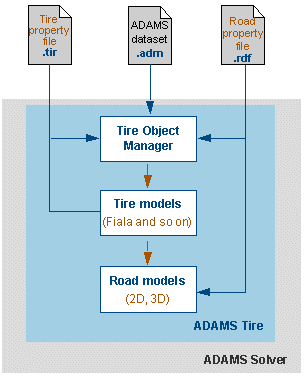
The following figure shows the relationship between Adams Tire, tire models, road models, and the tire and road property files.
Flow of Information in Adams Tire
What the STI Expects Tire and Road Models to Do
Learn about expectations for:
Tire Models
Adams Tire executes in two basic phases:
■Initialization - During the initialization phase, Adams Tire expects a tire model to:
♦Read parameters from the tire property file and return them to Adams Tire for storage in static memory.
♦Call the road model so it can read the road property file.
■Simulation - During the simulation phase, Adams Tire expects a tire model to:
♦Call the road model to obtain the tire-road contact point, local road normal, and coefficient of friction.
♦Calculate tire forces and moments and return them in System International (SI) units (Newton and Newton-meters) in the ISO-C (TYDEX) axis system (see About Axis Systems and Sign Conventions).
♦Return other results in an array for plotting and output. For example, return slip angle, inclination angle, and effective rolling radius.
The interaction between Adams Tire and tire models generally adheres to the TYDEX Working Group's Standard Tire Interface v1.4 (STI v1.4).To learn more about how Adams Tire interacts with tire models, including the calling arguments for TYRSUB, see Creating Tire Models for STI.
Road Models
Adams Tire does not directly call road models. Instead, Adams Tire calls the tire, and the tire model (TYRSUB) calls the road model. Again, there are two basic phases of execution:
■Initialization - During initialization, Adams Tire expects a road model to read parameters from the road property file and return them through the tire model to Adams Tire for storage in static memory.
■Simulation - During simulation, road models calculate the tire-road contact point, local road normal, and local coefficient of friction. The road model calculates these quantities based on the location and orientation of the wheel center of the tire. To learn more about road models, see Creating Road Models (STI).
Steps to Create a Tire or Road Model
Use the following steps as a guide when creating your own tire or road model:
1. Create your own tire model using the Example Tire Model (STI) as part of the distribution as a guide. Before you begin you should consider:
♦How your model differs from existing models included with Adams Tire.
♦How your tire model will calculate tire kinematic quantities, such as slip angle. Adams Tire provides utilities you might want to use (see Utilities for Reading Property Files).
♦What outputs Adams Tire requires for tire and road models. And, in the case of a tire model, what additional quantities you might want to output.
2. Create an example property file for use with your tire or road model and the code to read the file. Before you begin you need to know:
♦What parameters your tire or road property files will contain, including those required by Adams Tire.
♦How to read the parameters from the file and how to convert these parameters from the units specified in the property file to SI units (meters-kilograms-seconds).
♦Where to store the parameters in the tire (TYRARR) or road (ROPAR) parameters array so Adams Tire can save them between calls to your TYRSUB.
For more information, see Defining and Reading Tire Property Files.
3. Create a private version of an Adams Car or Adams Solver user library or use the tire plugin method, Instructing Adams Tire to Call Your TYRSUB and Instructing Adams Tire to Use Your Road Function.
4. Test your tire or road model using a simple Adams model, preferably the Adams Car Tire Testrig. Also you can find a simple Adams model and Adams Solver command files for testing tires and roads at install_dir/atire/models/tire_testrig_analysis_1. Access to a debugger is helpful to verify that your tire model is working properly.
Example Tire Model (STI)
Adams Tire includes an example tire model and its related files that implement a Fiala tire model with relaxation effects.
The example illustrates all the tasks a typical tire model must perform and provides you with a starting point when creating your own tire models. The example consists of the following files located at install_dir/atire/usrsubs:
■A tire property file incorporating a relaxation length parameter: usr_fiala.tir
■A subroutine for reading the tire property file: rpf501.f
■A TYRSUB that calls rpf501 to read the tire property file and that computes the tire forces and moments: tyr501.f
■An include file that tyr501.f and rpf501.f share. The include file defines the locations in the TYRARR array of parameters read from the tire property file: tyr501.inc
■Other include files that tyr501.f requires: abg_varptr.inc and ac_tir_jobflg.inc
To learn more about the default Fiala tire model supplied with Adams Tire, see Using the Fiala Handling Force Model.
Reference
1. H.-J. Unrau, J. Zamow, TYDEX-Format, Description and Reference Manual, Release 1.1, Initiated by the International Tire Working Group, July 1995.