Constraint Modify Higher Pair Contact Point Curve
Ribbon menu → Connectors Tab → Special container → Point-Curve Constraint 
or
(Classic) Right-click point-curve constraint → Modify
Changes the basic properties and sets initial conditions for a point-curve constraint. Learn more with Point-Curve Constraint Tool.
Learn more about Working with Higher-Pair Constraints.
Note: | You can also modify constraint properties using the Table Editor. |
For the option: | Do the following: |
|---|---|
Point Curve Name | Enter the name of the constraint to modify. |
Adams Id | Assign a unique ID number to the constraint. See Adams Solver ID. |
Comments | Add any comments about the constraint to help you manage and identify it. See Comments. |
Curve Name | Change the curve that defines the shape on which the point can move. You can enter a curve on a part or a curve element. Learn about working with Curves. |
I Marker Name | Point that moves along the curve. |
J Floating Marker Name | Enter a marker that is a floating marker. Adams Solver positions the origin of the floating marker at the instantaneous point of contact on the curve. It orients the marker so that its x-axis is tangent to the curve at the contact point, its y-axis points outward from the curve’s center of curvature at the contact point, and its z-axis is along the binormal at the contact point. 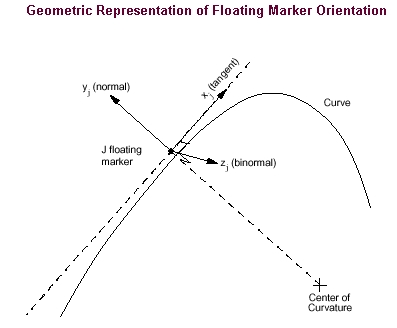 . . |
Ref Marker Name | Enter marker that is fixed on the part containing the curve on which the point must move. Adams Solver uses the reference marker to associate the shape defined by the curve to the part on which the reference marker lies. The curve coordinates are, therefore, specified in the coordinate system of the reference marker. |
Displacement Ic/ No Displacement Ic | Select either: ■Displacement Ic - Enter the initial point of contact along the curve. If the point you specify is not exactly on the curve, Adams View uses a point on the curve nearest to the point you specify. By default, you specify the initial point of contact in the coordinate system of the part containing the curve or specify it in the coordinate system of the marker you specify for Ic Ref Marker Name. ■No Displacement Ic - Leaves the initial displacement unset. |
Learn about Higher-Pair Constraints Initial Conditions. | |
Velocity Ic/No Velocity Ic | Select either: ■Velocity Ic - Velocity with which the point (I marker) moves along the curve. You specify the velocity in the coordinate system of the part containing the curve. ■No I Velocity Ic - Leaves the initial velocity unset. |
Ic Ref Marker Name | You can: ■Enter the marker with which the initial point of contact on the curve is specified. ■Leave blank. Adams View uses the coordinate system of the part containing the curve. |