About Adams Flex
Adams Flex software is an add-on module to the Adams® 2024.1 suite of software that lets you add flexible bodies to your models to achieve more realistic simulation results. The Adams Flex Help explains how to add flexible bodies to the models you build in Adams. It contains tutorial, overview, and theory information on integrating and managing flexible bodies.
Although you can use Adams Flex with Adams Solver, we recommend that you use Adams View because it provides an easy-to-use interface that is built right into the Adams View interface. Because of Adams View's advantages, the Adams Flex Help focuses on how to use Adams Flex with Adams View. For information on how to use Adams Flex with Adams Solver, see Flexible Body Modeling with Adams Solver.
Adams Flex Help also assumes that you know how to run Adams View or Adams Solver. It also assumes that you have a moderate proficiency level of finite element modeling. To use Adams Flex, you need access to a finite element analysis (FEA) program that interfaces with Adams so you can prepare a finite element (FE) model for use with Adams and create a Modal Neutral File (MNF) to be built into your Adams model.
See the section Adams File Types for more information on Adams Flex file types.
MD DB
In addition to using an MNF, a flexible body can be created directly from an MD DB. This offers better integration with Nastran and avoids generating an MNF. Please see Create an MD DB using MSC Nastran on how to create an MD DB that can be used in Adams.
Benefits of Adams Flex
By integrating flexible bodies into your model, you can:
■Capture inertial and compliance properties during handling and comfort simulations.
■Predict loads with greater accuracy by allowing Adams to account for flexibility during simulations.
■Study deformations.
■Examine the linear system modes of a flexible model when you use Adams Flex with Adams Linear. (For more on using Adams Flex with Adams Linear, see Using Adams Linear to Verify Flexible Bodies.)
Ways to Use Adams Flex
You can use Adams Flex with either Adams View or Adams Solver.
■Adams View - Using Adams Flex with Adams View, you can view the deformations of your flexible body, enhance the visual display, and easily specify the content of the flexible body that you want used in simulations. Adams View automates many of the operations for generating flexible body deformations for you.
■Adams Solver - You can use Adams Flex directly with Adams Solver, Adams's powerful analysis engine. We've provided Adams Solver statements and commands, as well as templates and tools to make it easier to create the necessary elements of a flexible body in Adams Solver.
■Template-based products - The template-based product, such as Adams Car, enhance the Adams Flex Modify dialog box and its functions to meet the needs of the types of models you are working with in that product, such as cars or engines. Refer to the template-based products online help for more information on these enhancements.
About Flexible Bodies in Adams Flex
Adams Flex uses an assumed modes method of modeling flexible bodies. This method of representing flexible bodies is called modal flexibility. Modal flexibility assigns a set of mode shapes (eigenvectors) to a flexible body. The flexible body modeling element designates a system state variable to each eigenvector and calculates the relative amplitude of each eigenvector during a time analysis. The principle of linear superposition is then used to combine the mode shapes at each time step to reproduce the total deformation of the flexible body.
This modal method of modeling flexibility can be very useful in problems that are characterized by high elasticity and moderate deflections (deflections less than 10% of a characteristic length of the body). Modal flexibility also provides a means of directly correlating Adams flexibility results with finite element analysis (FEA) results.
Learn more details about flexible bodies and when to use them.
Where to Use Flexible Bodies
You should use flexible bodies wherever you expect component flexibility to affect the dynamic behavior of your model or when you require accurate information about the deformations of a component in your model. If you are a handling analyst who is concerned about the negative effects of component flexibility or a component designer who is concerned about component strength and fatigue life, you can benefit from the ability to very accurately model component flexibility.
Where to Use Flexible Bodies with Care
When you use flexible bodies, you should remember that flexible body deformations are a linear combination of deformation shapes. Consequently, you must take special precautions when modeling higher order deformations, such as those that occur when deformations are large, or when attempting to correctly model centrifugal stiffening of rotating systems. You can overcome these limitations by dividing a flexible body into multiple flexible bodies and assembling them in Adams View. This technique is described in Modeling Nonlinear Deformations.
About the Flexible Body Description File (MNF)
You use a description of a flexible body from a finite element analysis (FEA) program called a modal neutral file (MNF) as the foundation of a flexible body in Adams Flex. The information in an MNF includes:
■Geometry (location of nodes and node connectivity)
■Nodal mass and inertia
■Mode shapes
■Generalized mass and stiffness for mode shapes
The MNF is a binary file that combines compact storage with efficiency of data access. The MNF is also platform independent, and you can use it on any platform on which Adams products run. In general, the MNF contains a large amount of data that Adams needs to access frequently. Therefore, you should not access the MNF across a network if you want maximum performance. In addition, you can obtain a platform-dependent MNF, which can improve flexible body animation performance in the Adams products.
To create an MNF, you or an FE expert write the data from an FEA program directly to an MNF or use translators available for the most popular FEA programs to translate the data from the FEA program to an MNF. For information on generating MNFs from an FEA program, see Translating FE Model Data. Note that once you've created an MNF, you can build it into Adams without having to access the FEA program from which it was generated.
About the MD DB
With this technique, products share the same database for data storage and transfer. Users can instruct Nastran to create an MD DB that can be used by Adams to create flexible bodies. The following are highlights of this new feature:
1. Multiple flexible bodies can be stored in one single database.
2. One database file is needed: .MASTER.
3. When multiple bodies are present in the database, the user needs an additional parameter, INDEX, to create a flexible body. The user can browse the contents of a database and get the index of a body through Adams Flex Toolkit.
4. It takes advantage of sophisticated Nastran Database access technology.
5. The database is platform-dependent.
Steps in Modeling Flexible Bodies
The steps that you perform to build a flexible body into Adams View and run Simulations are shown in the figure below.
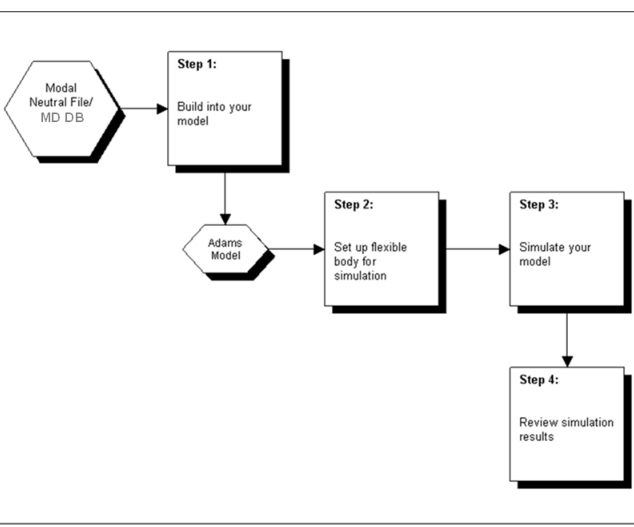
Figure 1 Adams Flex Steps
Note: | When creating flexible bodies using Nastran MD DB files, Adams will create a temporary .MASTER file on disk, with a name like db<number>.MASTER. Users should not attempt to use this file directly. |