MARKER
The MARKER statement defines a geometric point in space and a set of three mutually perpendicular coordinate axes emanating from that point.
Format
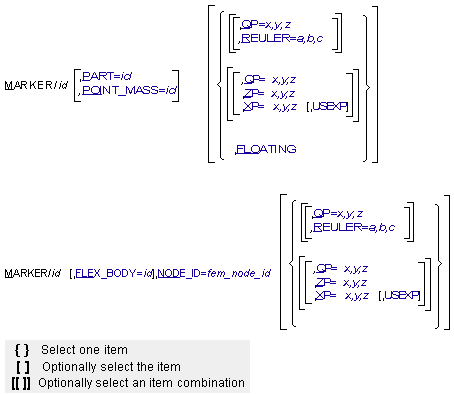
Arguments
FLOATING | Defines the marker as one that moves relative to the part with which it is associated. Without this argument, a marker is considered spatially fixed relative to the part with which it is associated. A floating marker must be used with VTORQUE, VFORCE, GFORCE, CVCV, and PTCV, and cannot exist without being referenced by one of these statements. |
FLEX_BODY=id | Specifies the identifier of the flexible body to which the marker belongs. A FLEX_BODY argument is not required in the MARKER statement if the MARKER statement follows the associated FLEX_BODY statement with no intervening FLEX_BODY, PART, or POINT_MASS statement. Default: ID of preceding FLEX_BODY, PART, or POINT_MASS Range: Flexible body IDs |
NODE=fem_node_id | Specifies that a marker is to be created at a point on a structure where a finite element node existed. The NODE argument can only be applied to a marker on a FLEX_BODY. A FLEX_BODY argument is not required if the MARKER statement follows the associated FLEX_BODY statement with no intervening FLEX_BODY, PART, or POINT_MASS statement. Default: None Range: IDs of nodes on the FLEX_BODY |
PART=id | Specifies the identifier of the part to which the marker belongs. A PART argument is not required in the MARKER statement if the MARKER statement follows the associated PART statement with no intervening FLEX_BODY, PART, or POINT_MASS statements. Default: ID of preceeding FLEX_BODY, PART, or POINT_MASS Range: Part IDs |
POINT_MASS=id | Specifies the identifier of the point mass to which the marker belongs. A POINT_MASS argument is not required in the MARKER statement if the MARKER statement follows the associated POINT_MASS statement with no intervening FLEX_BODY, PART, or POINT_MASS statement. Default: ID of preceding FLEX_BODY, PART or POINT_MASS Range: Point mass IDs |
QP=x,y,z | Defines the x-, y-, and z-coordinates of the origin of the MARKER with respect to the element on which it lies. The coordinates are specified in the body coordinate system (BCS). Range: Real numbers for x, y, and z |
REULER=a,b,c | Specifies the Euler angle 3-1-3 sequence rotation defining the spatial orientation of the marker axes relative to the element on which it lies. The orientation is relative to the body coordinate system (BCS). The a, b, and c, values represent the set of body-fixed 3-1-3 Euler angles expressed in radians. These angles can be interpreted by following the steps below. To orient a marker: 1. Align the marker axes identical to the axes of the parent coordinate system to which the orientation will be relative. 2. Perform a right-handed rotation of the marker x- and y-axes by a radians about the positive z-axis of the marker. 3. Rotate the marker y- and z-axes by b radians about the current marker positive x-axis. 4. Perform a right-handed rotation of the x- and y-axes of the marker by c radians about the current z-axis of the marker. To enter the Euler angles in degrees instead of radians, add a D after each value. Range: Real numbers for a, b, and c |
USEXP | Causes the marker to be oriented with the x-axis lying on XP, and ZP lying in the positive x-z plane, when using the x-point-z-point method of orientation. This is useful for orienting markers used in BEAM statements. Examples of using the ZP, XP and USEXP. |
XP=x,y,z | By default, defines the coordinates of any point in the positive x-z plane of the marker, but not on the z-axis of the marker. A point on the positive x-axis may be the most convenient. When used with USEXP, XP defines the BCS coordinates of any point on the positive x-axis of the marker. Examples of using the ZP, XP and USEXP. |
ZP=x,y,z | By default, defines the coordinates of any point on the positive z-axis of the marker. When used with USEXP, ZP defines the BCS coordinates of any point in the positive x-z plane of the marker, but not on the x-axis of the marker. Examples of using the ZP, XP and USEXP. |
Extended Definition
The marker defines a geometric point in space and a set of three mutually perpendicular coordinate axes emanating from the point. Markers are always associated with specific parts of a mechanism and can either be fixed on the part or may float relative to the part. A MARKER statement identifies the location and orientation of a marker with respect to a BCS. Markers are the basic building blocks used to specify points of: application for forces, connectivity for constraints, attachment for graphic elements, or interest in the model. For more information on BCS, see Coordinate Systems and Local Versus Global Geometric Data.
In the online help, a reference to a marker without a type usually refers to a fixed marker. A floating marker normally has the term floating associated with it in some way.
Requests for information pertaining to fixed and floating markers are easy to write (see REQUEST). However, only information on fixed markers can be used in FUNCTION arguments that affect how the model behaves. You may reference the position of a floating marker in a REQUEST statement or a REQSUB evaluation subroutine, for instance, but not in an SFORCE statement or a SFOSUB evaluation subroutine
Tip: | ■Markers on parts can be positioned anywhere relative to a BCS. ■Markers on flexible bodies must be positioned on a finite-element node. ■For every fixed marker, you specify the element to which it belongs and define its position and orientation. For every floating marker, you specify only the part to which it belongs. ■Select one of the following three methods to define the position and orientation of the marker: ■To select the Euler angles method, add QP and/or REULER. ■To select the x-point-z-point method using the ZP point to define a point on the z-axis, add QP, ZP, and/or XP. It is often unnecessary to define XP. ■To select the x-point-z-point method using the XP point to define a point on the x-axis, add QP, XP, and/or ZP, as well as USEXP. It is often unnecessary to define ZP. |
Caution: | All markers must belong to an element. If a MARKER statement is written without arguments to define its position and orientation, Adams Solver (FORTRAN) defines a marker with the same position and orientation as the BCS. |
Note: | In general, locate and orient a marker with respect to its parent BCS. If the marker is on the ground part or is on a part whose BCS is coincident with the ground coordinate system (GCS) at time zero, the marker can be positioned and oriented with respect to the GCS. |
Examples
MARKER/0406, ZP=0,1,0, XP=0,0,1, PART=4
This MARKER statement assigns Marker 0406 to Part 4 and defines the position and orientation of 0406 with respect to the BCS of Part 4 using the x-point-z-point method. QP defaults to QP=0,0,0, so Adams Solver (FORTRAN) positions Marker 0406 at the origin of the BCS. The ZP values indicate that the marker z-axis is parallel to the BCS y-axis and that the XP point lies on the BCS z-axis.
MARKER/0408, QP=2,0,0, REULER=90D,90D,0, PART=4
This MARKER statement, like the previous one, describes a marker on Part 4. Adams Solver (FORTRAN) places the origin of Marker 0408 at coordinates 2,0,0 with respect to the BCS. To orient the marker, Adams Solver (FORTRAN) aligns it with its BCS and then rotates the marker 90 degrees about its z-axis, 90 degrees about its new x-axis, and 0 degrees about its new z-axis.
MARKER/1002, FLOATING, PART=2
This MARKER statement defines a floating marker named Marker 1002 on Part 2. A floating marker requires the use of one of the following: VTORQUE, VFORCE, GFORCE, PTCV, or CVCV. The statement referencing the floating marker determines the instantaneous location and orientation of this marker.
MARKER/8007, XP=0,0,1, ZP=0.1,0,0.1, USEXP, PART=8
This MARKER statement defines Marker 8007 on Part 8. QP defaults to QP=0,0,0, so Adams Solver (FORTRAN) positions Marker 8007 at the origin of the BCS. With USEXP active, the XP values indicate that the marker x-axis passes through point 0,0,1, and the ZP values indicate the z-x plane passes through BCS coordinates 0.1,0.0,0.1.
Applications
Use fixed markers to:
■Designate the center of mass in a part (see the PART statement).
■Indicate the position and orientation of the coordinate system with respect to which you specify the part moments of inertia (see the PART statement).
■Define the position and orientation of a joint or joint-primitive connection point/direction. This requires two markers, one in each part that the joint or the joint primitive connects (see the JOINT and JPRIM statements).
■Denote force direction and action and reaction points (see the statements: BEAM, BUSHING, FIELD, SFORCE, and SPRINGDAMPER).
■Provide coordinate system(s) other than the ground coordinate system(s) for resolving the components of vector quantities such as velocities, accelerations, and forces (see the REQUEST statement).
Use floating markers to:
■Denote reaction points that can change position on a part (see the statements: VFORCE, VTORQUE, and GFORCE).
See other bordered available.